A few months ago I realized that I needed a better way to hold books as I copy passages for both reviews on this blog and for my academic work. A bit of Googling found some really janky looking products that led me to sigh and rig a solution that consisted of a bunch of heavy anthologies (those of you who were English majors might remember the infamous Nortons; they’ve finally become useful again, albeit in a way slightly different from their intent) to lean a book against, while the heaviest of them all sat slightly in front to hold the relevant book up.
This is a simple but well-designed book stand that does exactly what it sets out to do. It is sturdy enough to hold big, heavy textbooks, but [it] looks nice. It is impressively adjustable, allowing for nearly any reading angle . Amazingly, despite the ability to hold heavy books, the stand itself is relatively light (around 3 lbs). The stand has an anti-skid coating on the bottoms so that it stays where I put it.
Exactly what I wanted. Thank you, Stephanie Misono, for suggesting this. She says, “I now wish I had gotten it years ago.” Me too; I chose the Best Book Stand Jasmine, and it would’ve been insanely useful as an undergrad, when I spent many hours looking at computer science textbooks in particular, going back and forth from page to screen.
The Freesia version is too big, so I ordered the smaller version. I have something similar for standalone printed papers, but even that isn’t nearly as satisfying; I was making edits to a novel earlier, and I flipped from one page to another with greater ease by using the Jasmine. So it’s not only good for copying passages from books, but for holding edited pages.
Does this sound minor? Maybe it is, but managing to find the perfect tool to fulfill a major need is incredibly satisfying, and this is perhaps the best solution I’ve found to a major problem in my life since reading “Tool for Thought” by Steven Berlin Johnson, which concerns DevonThink Pro. Although these tools are useful on a micro level, they probably also change the nature of what I do; as Nicholas Carr says in The Shallows:
Even as our technologies become extensions of ourselves, we become extensions of our technologies […] every tool imposes limitations even as it opens possibilities. The more we use it, the more we mold ourselves to its form and function. […] Whenever we use a tool to exert greater control over the outside world, we change our relationship with that world.
I’m probably more likely to copy marginal passages from books now that it’s become marginally easier both to do so and to organize the output once I have done so. The Jasmine hasn’t yet faded to the point of it reaching what Heidegger called “readiness-to-hand” or “Zuhandenheit,” which, to use Graham Harman’s formulation, “refers to objects insofar as they withdraw from human view into a dark subterranean reality that never becomes present to practical action any more than it does to theoretical awareness.” I’m entirely aware of the Jasmine, which is part of its pleasure, but when it fades “into a dark subterranean reality,” it will be really incorporated into my work (I suspect that writing the dissertation might force this state on me, as one book after another checks in and check out).
The Jasmine cost about $30, with about $10 in shipping. I probably would’ve paid $100 for it. Maybe more. It’s difficult to overstate its usefulness, given the kind of work I do. Students, academics, and bloggers are an obvious audience, but I’m sure other groups would find it useful too.
James Fallows says that in order to avoid becoming a Kindle bore, you should “Just shut up when tempted to say or write anything about it. Otherwise you’ll be driving people crazy with your enthusing about how useful and convenient it is, and what its potential might be, and how many elegant decisions are evident in its conception and design.” I’m going to violate that right now by enumerating the number of things the Kindle does right and huge, giant thing it does wrong. If this makes me a bore, proceed to the next post.
Things done right: The screen is very, very nice, as is the tactile feel of the device itself. Although notes aren’t as satisfying to write as they are in paper, they work reasonably well and are easily aggregated. Using the “search” feature allows effectively infinite, immediate concordances in realtime. Shopping in the Kindle store is easy, although I think I’ve only bought two books from it because of the DRM.
The most useful thing about the Kindle for me isn’t actually reading books bought from Amazon—I’m reluctant to spend much money on them, knowing there’s a decent chance that in five years I’ll have a different device or won’t be able to transfer the books I buy now. Rather, Marco Arment’s Instapaper makes the Kindle insanely useful. If I find a longish article online, I hit the “Read Later” bookmarklet in Firefox. About once a week, I log into Instapaper and download all those articles on my Kindle. Bingo: I don’t have to keep printing and losing papers and I still get to read everything I want to read.
Things done wrong: The big-time, number one problem with the Kindle is its terrible software for organizing and managing documents. Actually, scratch that: it doesn’t really have software for managing documents.
The Kindle shows up as a generic USB device on OS X. Want to load it with .pdfs? Be prepared to drag them into a folder labeled “documents.” This process reminds me of .mp3 players… before the iPod. This doesn’t bode well for Amazon, especially now that the iPad is out.
The closest third-party app I’ve found so far is Calibre, which is clunky and doesn’t work that well, especially out-of-the-box. It won’t automatically sync to my Kindle at the moment for reasons not abundantly clear to me; it doesn’t have built-in optical character recognition (OCR) for .pdfs; it doesn’t automatically copy things bought off my Kindle to the computer. The list goes on. The difficulty of writing really good, really intuitive software like iTunes is really, really high.
I’m reminded of this post comparing Tumblr and Posterous, which compares those two “reblogging” tools. The basic point: design counts more than technology. At the moment, the Kindle’s technology is impressive. The physical hardware isn’t bad, although the screen should be bigger: there isn’t enough space before I have to scroll. But until iTunes for the Kindle comes along and whisks the searching and sorting problems away, the Kindle is effectively crippled by software.
I’m sure the omission of iTunes-for-the-Kindle is intentional on Amazon’s part: what they really want you to do is pay them money every time you buy a book or convert a .pdf. That’s okay but seems penny-wise and pound-foolish; think of Scott Adams’ complaint about bad user interfaces. At the end he asks, “What is your biggest interface peeve?” I now have one.
In other news, Apple released the iPad not long ago, which virtually every media outlet on the planet has covered. Megan McArdle says of it:
I’m still unsure how the iPad gets around the core problem: it doesn’t replace anything. Buying an iPhone let me take my phone, my camera, and my iPod out of the briefcase. Buying a Kindle let me remove a newspaper, several books, and some documents I have on PDF.
But if the iPad software is sufficiently better than the Kindle, users might end up chiefly with it.
One should read this article from Paul Buchheit’s blog, in which he notes the three reasons why the original iPod succeeded where others didn’t. It was:
1) small enough to fit in your pocket, 2) had enough storage to hold many hours of music and 3) easy to sync with your Mac (most hardware companies can’t make software, so I bet the others got this wrong).
Emphasis added. The weird thing is that Amazon is getting this wrong right now. Syncing the Kindle to my computer is cumbersome; there isn’t a good program for organizing my books and .pdfs. Charlie Stross writes about why he, a self-described UNIX bigot, uses a couple of Macs, instead of cheaper Linux boxes:
The reason I choose to pay through the nose for my computers is very simple: unlike just about every other manufacturer in the business, Apple appreciate the importance of good industrial design.
(Note: he’s British, which explains the “Apple appreciate” rather than “Apple appreciates.” The Brits think of corporations as plural, we think of them as singular. What would Steven Pinker say?)
I would also add that Apple has fewer and different hassles than running Linux boxes, which I say as someone who had periodic problems with audio drivers and other things in the ~2001 – 2003 range before I gave up. But the Kindle’s hassles are reminiscent of a product that should be better than it is. I’ve drifted somewhat from the main point regarding the Kindle, but the device is one of these “close, but still wrong” items that is somewhat frustrating, much like Linux, the last Volvo I drove, the Ikea desks I’ve seen, and chairs that unsuccessfully mimic the Aeron.
The Kindle is very, very good for English majors who get assigned a lot of pre-1923 fiction (which they can get free online) or for people who like reading from that era and do so voluminously. For the rest of us, it lacks, especially in the nonfiction department, where it’s hard to skip from section to section quickly.
Reading fiction on it is a substantially better experience because I seldom skip long sections in novels—it’s pretty hard to decide an entire chapter should be skipped, since that chapter will usually contribute something important to the story (and, if it doesn’t, the novel isn’t very good). In addition, novels are relatively unlikely to have research citations, which are sometimes important in evaluating nonfiction, especially if that nonfiction makes extensive or dubious claims. Right now, the small amount of nonfiction I’ve got doesn’t come with footnote hyperlinks. It shouldn’t be all that hard to create a style named, say, footnote with an automated number linking it to a later number so that one can jump freely back and forth between them. But that’s rare in the books I’ve read.
Amazon has released a kindle Software Development Kit (SDK), which might improve some of its current problems. But until it solves the “organizing home” problem that iTunes does so well, it’s not going to be a tremendously useful device for me and many other heavy readers who need some way of getting articles to and from the device. That’s a huge missing feature that Instapaper (somewhat) solves, but not well enough. The Kindle is an “almost” device, like many of the “almost” mp3 players before the iPod. But I don’t think almost is enough.
Despite my extensivecarping about the Digital Restrictions Management on the Amazon Kindle, I ordered one earlier today and now wish I’d been smart enough to do so last semester.
Why? I’m a graduate student in English Lit, and I looked at my reading requirements for this semester and found that the vast majority of the assigned books are out-of-copyright (meaning they were published before 1923), and I can download them free; most are also famous enough to make them easily accessible online. In other words, buying all my books for the semester will cost $200. Buying a Kindle will cost $259, plus another $30 for a case. The Kindle + free books effectively makes the Kindle $59. If I’d realized this last semester, it already would’ve paid for itself. In addition, I won’t have to lug around nearly as many .pdfs as I do now.
Given that the English curriculums appear to focus on pre-1923 texts, I’d be surprised if more English majors and grad students don’t take this path. At the moment, it’s possible to read class books either on a computer screen or print them out, but neither solution works all that well. I suspect this one will, though, as always, we shall see.
The Barnes and Noble Nook isn’t ready for prime time, according to David Pogue of the New York Times. Walter Mossberg of the WSJ agrees. Too bad: I was thinking about buying one, mostly for the .pdf capabilities, but I think I’ll wait—maybe for Kindle 3. I don’t think the Kindle’s current and potential dominance of the eBook market is good for books or consumers, and part of the reason that the Nook attracted me is precisely because it represents a real competitor to the Kindle. But these reviews indicate that the Nook was either rushed to market or poorly tested.
The .pdf issue is important to me because I’m a grad student in English and have to read a steadily larger number of articles and book chapters. Most get printed, but I no longer have the physical capacity to store, organize, and carry all of them, which makes something like the Kindle or Nook appealing, despite my reservations concerning the Digital Restrictions Management (DRM). By the way, you might want to check out the comments section on my post “New Kindle, same problems,” as Jason Fisher and Maggie Brookes have been talking books, ebooks, and culture in that space.
Interviewer: Do you think that the word processor has had or is having any effect on the study of literature?
Bloom: There cannot be a human being who has fewer thoughts on the whole question of word processing than I do. I’ve never even seen a word processor. I am hopelessly archaic.
Interviewer: Perhaps you see an effect on students’ papers then?
Bloom: But for me the typewriter hasn’t even been invented yet, so how can I speak to this matter? I protest! A man who has never learned to type is not going to be able to add anything to this debate. As far as I’m concerned, computers have as much to do with literature as space travel, perhaps much less. I can only write with a ballpoint pen, with a Rolling Writer, they’re called, a black Rolling Writer on a lined yellow legal pad on a certain kind of clipboard. And then someone else types it.
Interviewer: And someone else edits?
Bloom: No one edits. I edit. I refuse to be edited.
Since around 2002, I don’t think that the computer a writer uses has mattered much for writers, chiefly because virtually all computers on the market since that time will do everything you need: conjure up a window and allow you to type as long as you humanly can. The same applies to most word processors: I can’t remember the last time I got a word processor to crash except for Microsoft Word, and even that’s a very rare event. Around the time Windows XP and Mac OS X 10.2 came out, operating system stability problems receded—in Linux, they often weren’t present in the first place—and by now both Windows XP and the more recent versions of OS X are so stable that writers barely have to think about their computers if those machines are used primarily for writing.
This post comes in response to Betsy Lerner, who recently observed that she doesn’t work for Best Buy and therefore doesn’t know if an aspiring writer should buy a netbook (as a professional writer and wannabe novelist, I have some opinions on this stuff). For those of you too lazy to click the netbook link, netbooks are small laptops that usually range from 7 to 11 inches in screen size. I’d argue against netbooks: they tend to have lousy screens, and I wouldn’t want to look at one for an extended period of time. A desktop sounds more reasonable.
I prefer desktops because they tend to be more reliable and cost less, as described at the link. The new 27″ iMacs are particularly nice, and the screen attached is as good on the eyes as one can get among consumer machines. But your computer doesn’t matter much: get a $400 Dell with a 20″ monitor and you’ll still have a very nice set up. What actually matters is the time you spend with your ass in the seat, not what you’re facing while you write.
I like Macs, as demonstrated by this shot of my desk. But Windows, Linux, or OS X are all decent; all have fine, stable word processors. For documents you don’t have to share regularly, Mellel is a sweet word processor, and it has the full screen mode some writers really like. By “full screen,” I mean that you can hit command-shift-f and bring up a screen that looks like this, except much bigger:
That’s a real screenshot: you don’t have any menus or distractions on your screen, just text and a scroll bar. I added the black border in WordPress. Some people also like Mac Freedom, a program that “disables networking on an Apple computer for up to eight hours at a time” and sounds like a useful way of Disconnecting Distraction. Spotlight is very cool, as is DevonThink Pro. Both are especially useful for nonfiction.
Nonetheless, that’s the .1% of writing that doesn’t really matter much; the 99.9% that does is sitting at your computer and writing. And you can’t buy that for any amount of money.
Since around 2002, I don’t think that the computer a writer uses has mattered much for writers, chiefly because virtually all computers on the market since that time will do everything you need: conjure up a window and allow you to type as long as you humanly can. The same applies to most word processors: I can’t remember the last time I got a word processor to crash except for Microsoft Word, and even that’s a very rare event. Around the time Windows XP and Mac OS X 10.2 came out, operating system stability problems receded—in Linux, they often weren’t present in the first place—and by now both Windows XP and the more recent versions of OS X are so stable that writers barely have to think about their computers if those machines are used primarily for writing.
This post comes in response to Betsy Lerner, who recently observed that she doesn’t work for Best Buy and therefore doesn’t know if an aspiring writer should buy a netbook (as a professional writer and wannabe novelist, I have some opinions on this stuff). For those of you too lazy to click the netbook link, netbooks are small laptops that usually range from 7 to 11 inches in screen size. I’d argue against netbooks: they tend to have lousy screens, and I wouldn’t want to look at one for an extended period of time. A desktop sounds more reasonable.
Desktops tend to be more reliable and cost less. The new 27″ iMacs are particularly nice, and the screen attached is as good on the eyes as one can get among consumer machines. But your computer doesn’t matter much: get a $400 Dell with a 20″ monitor and you’ll still have a very nice set up. What actually matters is the time you spend with your ass in the seat, not what you’re facing while you write.
I like Macs, but Windows, Linux, or OS X are all decent; all have fine, stable word processors.
The main question regarding the Das Keyboard Professional Model “S” should not be whether it’s a very nice keyboard: it is. The keys are precise and smooth, and the amount of force necessary to generate a letter is far more appropriate than the standard keyboards shipped with most computers. Rather, the main question should be: is the Das Keyboard substantively better than the Unicomp Customizer and Space Saver, both of which use the time-tested IBM Model M design and manufacturing equipment? The answer is probably “no,” especially when one considers their relative cost: as of this writing, the Unicomp keyboards are $69 and made in the United States, while Das Keyboards are $129 and made in Taiwan.*
First impressions
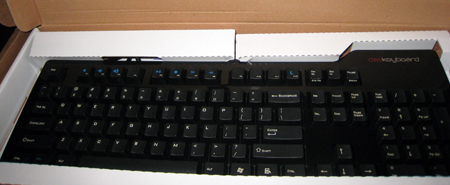
The slim keyboard and its housing:
As shown, the Das Keyboard is black and unadorned by anything save a “daskeyboard” logo in the upper right. The keys themselves are matte black with white letters etched in by laser, while the borders are glossy and probably prone to fingerprints and smudging over time. The attractive minimalist design makes the keyboard look like part of a set when placed next an iMac and Aeron, as though it were designed to complement them.
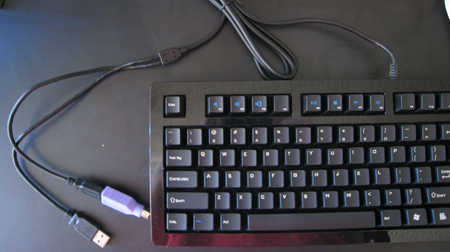
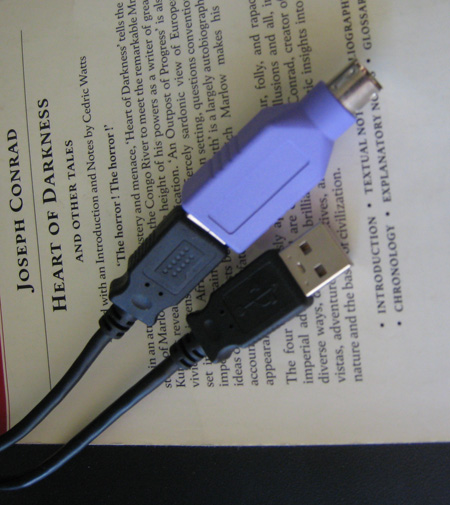
The chief drawback aesthetically and practically is the split USB cord:
Not surprisingly, a picture like this doesn’t appear on the Das Keyboard website. It’s reminiscent of the Matias Tactile Pro 2, and not in a good way.
But the Das Keyboard does have two USB ports on the side, which is a useful feature the Customizer lacks. To me it doesn’t make much of a difference: I taped a four-port, powered USB hub to the bottom of my desk, and that’s where I plug in peripherals, my printer, and an iPhone cord. The hub cost $10, like the one at the link, although I bought mine elsewhere.
The keys
Each stroke brings a satisfying but muted clack, and I like typing on the Das Keyboard. Its keys don’t travel quite as far as the Customizer or Space Saver’s; it’s also easier to bottom out because one doesn’t have the curious resistance that a buckling spring provides, as described here:
The most widely produced buckling-spring keyswitch keyboard is the IBM model M keyboard. When pressing an individual key, the operator is physically applying increasing force (approximately 60-70 grams of force) against a coiled spring. The spring provides slight resistance, so that you can rest your fingers on the keyboard and not cause an accidental or inadvertent key press. Once the key travels a particular distance (approx. 2.5 – 3.5mm), the spring reaches the “catastrophic buckling” point and produces an audible click at the same exact instance that the computer records the keystroke.
With the Das Keyboard, you can still rest your fingers on the keys, but when typing you won’t have the catastrophic buckling that prevents bottoming out. Consequently, the Das Keyboard has a slightly harsher feel than the Customizer or Space Saver. It seems to take approximately the same amount of force to generate a keystroke, but that’s based solely on feel rather than on testing. There might be an objective difference between the two, but if so, it’s not great.
The key switches themselves appear to Cherry MX Blues, which are explained in greater detail at the link and in this Hot Hardware essay. You can see them in the Das Keyboard here:
These switches are louder, though not enormously so, than the Cherry MX “Brown” switches found in the Kinesis Advantage Ergonomic Keyboard, which I reviewed at the link, or the Majestouch Tenkeyless Keyboard. You could use the Kinesis Advantage or Majestouch Tenkeyless keyboard in a dorm or office without offending those in the same room, but the Das Keyboard is probably too loud for those environments. I assume the “silent” version uses Cherry MX “Brown” switches that are quieter and also appropriate for group settings. To get a sense of how loud each keyboard is, check out this video, which compares the Advantage, Customizer, and Das Keyboard:
What do all these models mean?
If you’ve visited the Das Keyboard website, you’re probably aware that you can buy four models: the “Original Das Keyboard Professional, “Das Keyboard Model “S” Professional,” which I am reviewing, the “Das Keyboard Model “S” Professional Silent,” and the “Das Keyboard Model “S” Ultimate.”
Here’s how the somewhat confusing nomenclature and model numbers work: A Das Keyboard “Professional” means there are letters on the keyboard, like mine; not having any letters doesn’t seem to confer any benefit aside from sheer geek street cred, about which I care less than practicality. A Das Keyboard “Ultimate” is identical to the “Professional” except that it’s blank. The Das Keyboard “Silent” is quieter, presumably due to using Cherry MX “Brown” switches like those mentioned above.
The Original Das Keyboard Professional lacks media function keys, has only a single USB connector, isn’t compatible with KVM switches, and doesn’t have “Full n-key rollover,” which means that if you mash, say, six keys at once, the keyboard might not register all of them. The last feature is apparently useful for gaming. The short version is that the differences between the “Original” and “Model S” are marginal and not very important. Given the choice, I’d probably take the original.
Mac support
The Das Keyboard supports OS X and Linux as well as Windows. You can buy a set of Mac- and Linux-friendly keycaps for $14.95, which is comparable to Unicomp’s cost for OS-specific keys. You’ll have to swap the Option and Command key in OS X’s system preferences, as described here.
A strange problem
Edit Nov. 12 2009: Thomas Aitchison of Das Keyboard sent me an e-mail saying that the problem I described below is a known bug and that the company is recalling the keyboards in the affected serial number range, so this probably no longer applies.
Every couple hours, a key would stop working. The first time it was the “e:” I typed “swt” instead of “sweet” in TextMate. The same thing happened in Word and Mellel. But when I plugged the keyboard into my MacBook, the “e” was back, and switching back to my iMac also solved the problem. The same thing happened a few hours later with the “control” key. Unplugging the keyboard and plugging it back in did the trick. It happened again with the “p” key, and presumably with others that I hadn’t noticed because I didn’t use them.
In addition, the remapped “option” key doesn’t function properly. In OS X, option-shift-hyphen generates an em dash, like this: —. But I had to remap the caps lock key to option to generate that dash. I have no idea why. This hasn’t happened with any of the other keyboards I’ve used with this computer: the Matias Tactile Pro, the Customizer, the Advantage, or the Apple Aluminum Keyboards. I assume this is a problem unique to this particular Das Keyboard or to this Das Keyboard with my iMac; if this happened with a purchased computer, the company promises “For repair and exchange: no waiting, no hassle. We will ship you a replacement as soon as we receive your shipment.”
A second opinion
My girlfriend used the Das Keyboard for a day and didn’t like it as much as I did: she said she heard a high-pitched squeak from it. Of the keyboards I’ve tried recently, she likes the Kinesis Advantage best. In comparison to the Unicomp Customizer, she wrote, “WAY better than the daskeyboard. […] It takes a little more effort, and maybe I’ll find at the end of the day my muscles aren’t a fan of it, but for now, it’s definitely better. Feels more solid.”
Conclusion
Even Das Keyboard’s website says that “Das Keyboard compares to the legendary IBM model M. Its best-in-class mechanical gold-plated key switches provide a tactile and audio click that makes typing a pure joy.” They’re right: it does compare to the Model M. Either keyboard is an good choice. If I had to make it, I’d take the Model M. Its durability is proven, the key travel is slightly better, and it sounds slightly more like a typewriter and slightly less “plasticky” to my ears. In addition, it’s about $50 cheaper after shipping. The only drawback is the lack of USB ports, which seems minor in comparison to how the keyboard feels.
* I don’t highlight where the keyboards are made out of a misplaced and ignorant jingoistic nativism, but rather because, all else being equal, I’d generally choose the item made in a western country (Canada, the United States, most of Europe) over one not made there under the assumption that the workers are probably treated better and make living wages. Taiwan is an industrialized country, so this probably doesn’t apply, but I notice the difference anyway. In addition, products made elsewhere usually cost less; I find it suggestive that, in this case, the opposite is true.
* Note: The review unit was provided by Das Keyboard and returned to the manufacturer after this review was written.
The main question about the Das Keyboard Professional Model “S” is not whether it’s a very nice keyboard: let me get that out of the way by saying it is. The keys are precise and smooth, and the amount of force necessary to generate a letter is far more appropriate than the standard keyboards shipped with most computers.
Instead, the main question is whether the Das Keyboard is substantively better than the Unicomp Customizer and Space Saver, both of which use the time-tested IBM Model M design and manufacturing equipment. The answer is probably “no,” especially when one considers their relative cost: as of this writing, the Unicomp keyboards are $69 and made in the United States, while Das Keyboards are $129 and made in Taiwan.*
First impressions
The slim keyboard and its housing:
As shown, the Das Keyboard is black and unadorned by anything save a “daskeyboard” logo in the upper right. The keys are matte black with white letters etched in by laser—a nice touch—while the borders are glossy and probably prone to fingerprints and smudging over time. The attractive minimalist design makes the keyboard look like part of a set when placed next an iMac and Aeron, as though it were designed to complement them.
The chief drawback aesthetically and practically is the split USB cord:
Not surprisingly, a picture like this one doesn’t appear on the Das Keyboard website. It’s reminiscent of the Matias Tactile Pro 2, and not in a positive way.
But the Das Keyboard does have two USB ports on the side, which is a useful feature the Customizer lacks. To me extra USB ports don’t make much difference: I taped a four-port, powered USB hub to the bottom of my desk, and that’s where I plug in peripherals, my printer, and an iPhone cord. The hub cost $10.
The keys
Each stroke brings a satisfying but muted clack. I like typing on the Das Keyboard. Its keys don’t travel quite as far as the Customizer or Space Saver’s, and it’s also easier to bottom out because one doesn’t have the curious resistance that a buckling spring provides, as described here:
The most widely produced buckling-spring keyswitch keyboard is the IBM model M keyboard. When pressing an individual key, the operator is physically applying increasing force (approximately 60-70 grams of force) against a coiled spring. The spring provides slight resistance, so that you can rest your fingers on the keyboard and not cause an accidental or inadvertent key press. Once the key travels a particular distance (approx. 2.5 – 3.5mm), the spring reaches the “catastrophic buckling” point and produces an audible click at the same exact instance that the computer records the keystroke.
With the Das Keyboard, you can still rest your fingers on the keys, but when typing you won’t have the catastrophic buckling that prevents bottoming out. Consequently, the Das Keyboard has a slightly harsher feel than the Customizer or Space Saver. It seems to take approximately the same amount of force to generate a keystroke, but that’s based solely on feel rather than on testing. There might be an objective difference between the two, but if so, it’s not great.
The key switches themselves appear to Cherry MX Blues, which are explained in greater detail at the link and in this Hot Hardware essay.
These switches are louder, though not enormously so, than the Cherry MX “Brown” switches in the Kinesis Advantage Ergonomic Keyboard or the Majestouch Tenkeyless Keyboard. You could use the Kinesis Advantage or Majestouch Tenkeyless keyboard in a dorm or office without offending those in the same room, but the Das Keyboard is probably too loud for those environments. I assume the “silent” version uses Cherry MX “Brown” switches that are quieter and also appropriate for group settings. To get a sense of how loud each keyboard is, check out this video, which compares the Advantage, Customizer, and Das Keyboard:
What do all these models mean?
If you’ve visited the Das Keyboard website, you’re probably aware that you can buy four models: the “Original Das Keyboard Professional, “Das Keyboard Model “S” Professional,” which I am reviewing, the “Das Keyboard Model “S” Professional Silent,” and the “Das Keyboard Model “S” Ultimate.”
Here’s how the somewhat confusing nomenclature and model numbers work: A Das Keyboard “Professional” means there are letters on the keyboard, like mine; not having any letters doesn’t seem to confer any benefit aside from sheer geek street cred, about which I care less than practicality. A Das Keyboard “Ultimate” is identical to the “Professional” except that it’s blank. The Das Keyboard “Silent” is quieter, presumably due to using Cherry MX “Brown” switches like those mentioned above.
The Original Das Keyboard Professional lacks media function keys, has only a single USB connector, isn’t compatible with KVM switches, and doesn’t have “Full n-key rollover,” which means that if you mash, say, six keys at once, the keyboard might not register all of them. The last feature is apparently useful for gaming.
The differences between the “Original” and “Model S” are marginal and not very important. I’d probably take the original.
Mac support
The Das Keyboard supports OS X and Linux as well as Windows. A set of Mac- and Linux-friendly keycaps goes for $14.95, which is comparable to Unicomp’s cost for OS-specific keys. You’ll have to swap the Option and Command key in OS X’s system preferences, as described here.
A strange problem
Edit Nov. 12 2009: Thomas Aitchison of Das Keyboard sent me an e-mail saying that the problem I described below is a known bug and that the company is recalling the keyboards in the affected serial number range, so this probably no longer applies.
Every couple hours, a key would stop working. The first time it was the “e:” I typed “swt” instead of “sweet” in TextMate. The same thing happened in Word and Mellel. But when I plugged the keyboard into my MacBook, the “e” was back, and switching back to my iMac also solved the problem. The same thing happened a few hours later with the “control” key. Unplugging the keyboard and plugging it back in did the trick. It happened again with the “p” key.
In addition, the remapped “option” key doesn’t function properly. In OS X, option-shift-hyphen generates an em dash, like this: —. But I had to remap the caps lock key to option to generate that dash. I have no idea why. This hasn’t happened with any of the other keyboards I’ve used with this computer: the Matias Tactile Pro, the Customizer, the Advantage, or the Apple Aluminum Keyboards. I assume this is a problem unique to this particular Das Keyboard or to this Das Keyboard with my iMac. Fortunately, the company promises: “For repair and exchange: no waiting, no hassle. We will ship you a replacement as soon as we receive your shipment.”
A second opinion
My girlfriend used the Das Keyboard for a day and didn’t like it as much as I did: she said she heard a high-pitched squeak. Of the keyboards I’ve tried recently, she likes the Kinesis Advantage best. In comparison to the Unicomp Customizer, she wrote, “WAY better than the daskeyboard. […] It takes a little more effort, and maybe I’ll find at the end of the day my muscles aren’t a fan of it, but for now, it’s definitely better. Feels more solid.”
Conclusion
Even Das Keyboard’s website says that “Das Keyboard compares to the legendary IBM model M. Its best-in-class mechanical gold-plated key switches provide a tactile and audio click that makes typing a pure joy.” They’re right: it does compare to the Model M. Either keyboard is an good choice.
But I’d take the Model M. Its durability is proven, the key travel is slightly better, and it sounds more like a typewriter and slightly less “plasticky” to my ears. It’s about $50 cheaper after shipping. The only drawback is the lack of USB ports, which is minor.
* I don’t highlight where the keyboards are made out of a misplaced and ignorant jingoistic nativism, but rather because, all else being equal, I’d generally choose the item made in a western country (Canada, the United States, most of Europe) over one not made there under the assumption that the workers are probably treated better and make living wages. Taiwan is an industrialized country, so this probably doesn’t apply, but I notice the difference anyway. In addition, products made elsewhere usually cost less; I find it suggestive that, in this case, the opposite is true.
* Note: The review unit was provided by Das Keyboard and returned to the manufacturer after this review was written.
Some of the Slashdot comments show the worst of Slashdot’s solipsism and narrow-mindedness, however. This one in particular is galling because its author obviously doesn’t know what he’s talking about. For example, he says that “If, by “professional writer,” you mean someone actually producing text, the main needs are a good text editor, which can be found many places.”
With all due respect, I don’t think he knows what he’s talking about. A good text editor, even one that’ll give diffs, is nowhere near as fast and as easy as Word’s track changes system. As Philip Greenspun, well-known Microsoft shill, says regarding his book writing project:
At least at Macmillan, everyone collaborates using Microsoft Word. I’d wanted to write my book in HTML using Emacs, the text editor I’ve been using since 1978. That way I wouldn’t have to do any extra work to produce the on-line edition and I wouldn’t be slowed down by leaving Emacs (the world’s most productive text editor, though a bit daunting for first-time users and useless for the kind of fancy formatting that one can do with Frame, Pagemaker, or Word). Macmillan said that the contract provision to use Word was non-negotiable and now I understand why.
Microsoft Word incorporates a fairly impressive revision control system. With revision control turned on, you can see what you originally wrote with a big line through it. If you put the mouse over the crossed-out text, Word tells you that “Angela Allen at Ziff Davis Press crossed this out on March 1, 1997 at 2:30 pm.” Similarly, new text shows up in a different color and Word remembers who added it. Finally, it is possible to define special styles for, say, Tech Reviewer Comments. These show up in a different color and won’t print in the final manuscript.
The original commenter says that free software can replace Word. I’d observe that a) everyone I have to collaborate with has Word and b) only one other person I know has Open Office.org, which also looks hideously ugly on OS X and, when I’ve tried to use it, crashes frequently. Most professional writers appear to use Word. That they don’t migrate en masse to text editors, which have been around since at least the 1970s, shows that there must be some advantage, even if it’s merely network effects, to using it.
Another commenter said that Word “has too large an installed base and there is too much inertia for people to change,” inspiring a third person to chime in, “You know, I’m sure they used to say the same thing about Wordperfect, remember them?”
And in those days, the total number of computers bought every year exceeded the entire previous install base, year after year. Since the neighborhood of the late ’90s, however, that hasn’t been true. Today, if you want to get people to switch operating systems/word processors/e-mail clients/whatever, you have to get people who already have computers to consciously change their behavior. This is really, really hard to do. That’s the difference between WordPerfect’s dominance in the ’80s and Word’s dominance today.
Microsoft grew up during the 1980s and 1990s, when the growth in personal computers was so dramatic that every year there were more new computers sold than the entire installed base. That meant that if you made a product that only worked on new computers, within a year or two it could take over the world even if nobody switched to your product. That was one of the reasons Word and Excel displaced WordPerfect and Lotus so thoroughly: Microsoft just waited for the next big wave of hardware upgrades and sold Windows, Word and Excel to corporations buying their next round of desktop computers (in some cases their first round).
According to the research firm Gardner, “For the year [2008], worldwide PC shipments totaled 302.2 million units…” But Forrester estimates that there are about a billion computers in use. Many of those are probably first-time buyers in developing countries, second computers, computers for children, used by the same person at home and at work, and so forth; nonetheless, even if every one of those new computers replaced a single old computer, it would still take more than three years for the market to churn. That’s a major difference, and the installed based issue is why Word (and office) aren’t going anywhere fast.
I don’t love Word and used Lotus Word Pro for years after it had been effectively abandoned because its styles functionality was (and still is) vastly superior to Word’s. But the program isn’t available for OS X and has died in IBM’s bowels. In the current computing world, it’s hard to imagine Word being superseded on the desktop; at some point in the future, a browser-based word processor might overtake it, but that day is still further off than many Internet prognosticators believe.
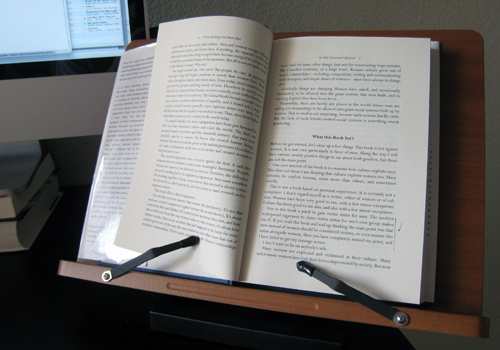 A few months ago I realized that I needed a better way to hold books as I copy passages for both reviews on this blog and for my academic work. A bit of Googling found some really janky looking products that led me to sigh and rig a solution that consisted of a bunch of heavy anthologies (those of you who were English majors might remember the infamous Nortons; they’ve finally become useful again, albeit in a way slightly different from their intent) to lean a book against, while the heaviest of them all sat slightly in front to hold the relevant book up.
 Exactly what I wanted. Thank you, Stephanie Misono, for suggesting this. She says, “I now wish I had gotten it years ago.” Me too; I chose the Best Book Stand Jasmine, and it would’ve been insanely useful as an undergrad, when I spent many hours looking at computer science textbooks in particular, going back and forth from page to screen.
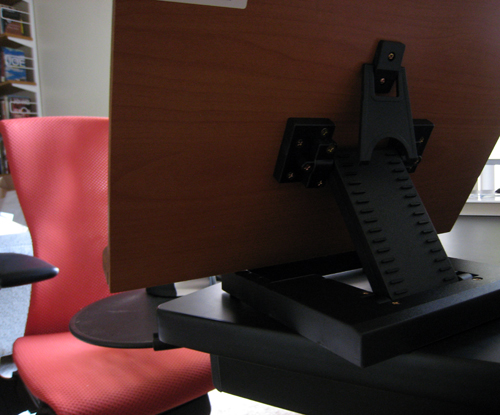 Does this sound minor? Maybe it is, but managing to find the perfect tool to fulfill a major need is incredibly satisfying, and this is perhaps the best solution I’ve found to a major problem in my life since reading “Tool for Thought” by Steven Berlin Johnson, which concerns DevonThink Pro. Although these tools are useful on a micro level, they probably also change the nature of what I do; as Nicholas Carr says in The Shallows:
 I’m probably more likely to copy marginal passages from books now that it’s become marginally easier both to do so and to organize the output once I have done so. The Jasmine hasn’t yet faded to the point of it reaching what Heidegger called “readiness-to-hand” or “Zuhandenheit,” which, to use Graham Harman’s formulation, “refers to objects insofar as they withdraw from human view into a dark subterranean reality that never becomes present to practical action any more than it does to theoretical awareness.” I’m entirely aware of the Jasmine, which is part of its pleasure, but when it fades “into a dark subterranean reality,” it will be really incorporated into my work (I suspect that writing the dissertation might force this state on me, as one book after another checks in and check out).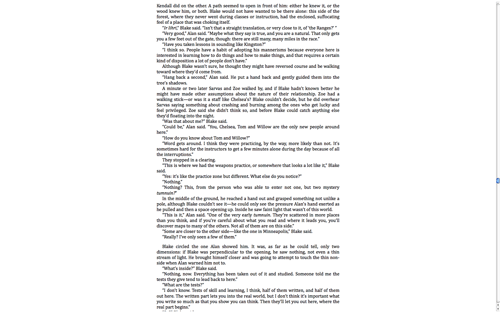

 The Story's Story