Product Review: Kinesis Advantage ergonomic keyboard

(Note: The original review is below, but I’m adding this addendum because I’ve started using the Kinesis Advantage as my primary keyboard. Regular keyboards now feel cramped and uncomfortable for extended use, and although my review is mostly positive, over time the Advantage has received the greatest accolade of all: it’s the keyboard I prefer to use.)

Two kinds of people are likely to want the Kinesis Advantage Keyboard: efficiency freaks and repetitive stress injury (RSI) sufferers. The Advantage is an unusual beast that promises a better keyboarding experience than conventional, flat keyboards. Does it? I firmly answer maybe, although enough people swear by them to make me think that, if nothing else, those with wrist pain or repetitive stress injuries benefit from the placebo effect if nothing else. There are two major barriers to using the keyboard: the first is retraining, which can be overcome relatively quickly. The second is the $300 retail price.

Still, once one adapts, typing becomes fun, like learning a secret. The Advantage’s curves remind one of advanced spaceship controls from a science fiction movie, as this manufacturer-provided picture demonstrates:

The Advantage; this image was provided by Kinesis.

The Advantage.

Initial impressions and adjustments

I learned to touch type in sixth grade using Mavis Beacon teaches typing and remember the many frustrating hours spent struggling to learn while knowing that process would pay off. The Advantage makes you a beginner again, although learning was considerably easier than last time and the user’s manual wisely states that “Many new users of Kinesis contoured keyboards believe it will be difficult to adapt.”

It’s not hard, but it will take at least an hour of practice before you become proficient enough to use the keyboard regularly. For the first few days, my words per minute dropped precipitously. Yet I also discovered new things about the way I type, like that I tend to use my left index finger to hit “c.” This is a major problem on the Kinesis advantage because it’s virtually impossible to touch type and still use the index finger for that key. Even now, about half the time I come to a word with “c” in it, I get a “v,” instead; in this sentence, for example, I first wrote “vome.” A friend who tried the Kinesis didn’t have that problem, however, so it’s probably an issue unique to me.

The instincts of so many years of typing on standard keyboards are not broken in a week. This isn’t surprising given how long they’ve been ingrained. But an evening of steady practice was enough to become more or less proficient in everything except the aforementioned “c” key, which is located in a deep well where I couldn’t reach until I developed the necessary muscle memory through practice. By the start of week two, however, I was quite fast. Now I write this on my usual Unicomp Customizer and my hands feel strangely cramped, as if my fingers are constantly running into one another and I’m forced to use too small a space. This might simply show the power of adaptation and familiarity—themes I’ll return to later.

One nice feature of the Advantage is obvious from the start: Macs are first-class citizens out of the box, and no keyboard remapping is needed. As described below, a properly labeled command key is even included.

Ergonomics

The Advantage forces you to have better ergonomic posture; it’s hard at first, then it gets easier as time goes on. One’s forearms are almost forced to rest on the arm’s of a well-adjusted chair. One’s hands are spread wide, and the thumbs don’t arch as they naturally do on a standard regular keyboard. The thumbs are also used for a wider array of tasks, since the backspace, enter, and regular space characters are also driven by the thumbs. This distributes the keyboard load across one’s fingers.

The major downside of this “spread” keyboard design is that I found it difficult to reach some keys, including page up, page down, hyphen, and equals. Perhaps not coincidentally, they’re also keys I use more rarely than major keys, so I might simply have needed more time. Some key combinations, like the one for an em-dash, were a major pain at first. This is especially surprising because I’m a tall person with relatively big hands; women with small hands might find reaching some keys more difficult than me.

I also found it easier to sit with a straight back while using the Advantage. This might have been easier for me because I use a Humanscale keyboard tray that’s infinitely adjustable within about a six inch range, making finding the right level for the keyboard easy.

Tactile feel

As discussed in my post on More words of advice for the writer of a negative review, it’s hard to disentangle familiarity from genuine superiority; for example, some of Malcolm Gladwell’s work regarding the initial reaction to the Herman Miller Aeron Chair and the well-known negative response to Stravinsky’s The Rite of Spring are reactions to things that are novel rather than bad. That being said, I still prefer the buckling springs that give the Unicomp Customizer and IBM Model Ms their bounce and unique feel.

Still, the Kinesis uses very nice Cherry MX Brown keyboard switches, which offer tactile feel superior to cheap keyboards that use rubber dome switches (the linked article explains more about what this means):
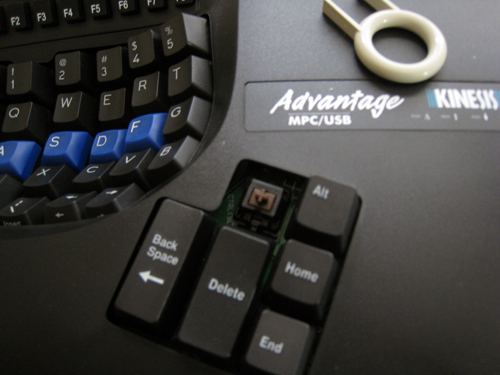
The tool used to remove keycaps is at the upper right; putting Mac-labeled keys on was easy.

The tool used to remove keycaps is at the upper right; putting Mac-labeled keys on was easy.

(Notice too the plastic device on the keyboard: that’s a key swapper included in the package, which allows one to immediately put a “command” key appropriate for Macs on the board. That’s a considerable improvement over Unicomp, which requires that one call to receive the appropriate caps.)

The Cherry switches are also considerably quieter than buckling springs, making the Advantage usable in group working environments. Attempting to use a Customizer for extended periods of time with others in the room probably won’t result in those others using the keyboard to forcefully silence its owner.

Overall, the Advantage has excellent keys.

Warning for programmers

In the default configuration, the brackets—[ and ]— and curly brackets—{ and }—are located in difficult-to-reach spots on the lower right side of the keyboard, necessitating a long stretch of the fingers. As such, almost anyone who does a fair amount of coding will want to remap the keyboard to make those keys easier to reach.

Durability

In the weeks I used mine, I saw no change in the keyboard. Although it’s made of plastic and not nearly as heavy as the Customizer, the Advantage feels sturdier than most original equipment manufacturer (OEM) keyboards. If any readers have used an Advantage for an extended period of time and would like to leave comments about their long-term durability, please do so.

Do repetitive stress injuries from keyboard usage actually exist? …

In a discussion about an article called “The World’s Greatest Keyboard,” some posters at Hacker News cited impressive evidence against RSI as being real; for example, one linked to John Sarno’s The Mind-Body Prescription, including this document summarizing his work. Another poster said that “There was a majority physical component [to his RSI problems] — actually using the mouse was much, much more painful — but there was also a psychological component. I suspect that this was anticipatory tension or somesuch, similar to a flinch response.” Another poster cited this series of posts about curing himself of RSI problems through psychology modification. There were also recommendations for this Trigger Point Therapy Workbook.

Given that testimony, as well as those who say the Advantage alleviated their pain problems, I’m not sure what to believe. I recall reading about studies that have found improved productivity among office workers when researchers increased or decreased lighting, or when researchers raise or lower temperatures. The theory is that workers aren’t necessarily more productive in higher or lower temperatures, but rather that they subconsciously respond to changes that show management is paying attention to them. By the same token, people with RSI problems might respond to keyboards like the Kinesis Advantage chiefly because they think that it will help them and because they have read accounts like the ones on Hacker News that claim improvement. This isn’t necessarily a bad thing: just because something happens in your head thanks to belief doesn’t mean it isn’t real.

… And assuming RSI injuries exist, will the Advantage fix them?

The existing research on the Kinesis Advantage is positive, but I’m not sure that any of the study designs I’ve found eliminate the placebo effect. For example, An evaluation of the ergonomics of three computer keyboards (2000) finds that “fixed” designs” like the Microsoft contoured keyboard “promoted a more natural hand position.” But the conclusion states that “the FIXED design has the potential to improve hand posture and thereby reduce the risk of developing cumulative trauma disorders of the wrist due to keyboard use.” Right. But does it actually improve such disorders? Tough call.

Another study, An ergonomic evaluation of the Kinesis ergonomic computer keyboard, found that:

Electromyographic data analysis showed that the resting posture on the Kinesis Ergonomic Computer Keyboard required significantly less activity to maintain than the resting posture on the standard keyboard for the flexor carpi ulnaris and the flexor digitorum sublimis. Furthermore, the Kinesis Ergonomic Computer Keyboard reduced the muscular activity required for typing in the flexor carpi ulnaris, the extensor digitorum communis. and the flexor digitorum sublimis.

Just because the Kinesis keyboards reduce stress on some body parts doesn’t necessarily mean you’ll automatically see a reduction in RSI issues. Both studies also come from the journal Ergonomics, which is still publishing, they appear to be reputable.

Another study, An assessment of alternate keyboards using finger motion, wrist motion and tendon travel (2000) is much more limited in scope and finds that Kinesis-style designs reduce tendon travel. But the “so what?” factor applies here too. “An assessment of alternate keyboards,” however, does not gender differences in the tendon travel, which is of interest because I still wonder if people with small hands would find it harder to type on the Advantage—perhaps the greater male tendon travel makes reaching unusual keys easier.

These studies do show, however, genuine differences in the physiology of keyboard usage. Consequently, people suffering from RSI issues should try the Advantage if they can afford it.

A word on price and productivity

No review can fail to mention the $300 price for an advantage. That’s obviously a lot of cash relative even to other high-quality keyboards. But compare the price of the keyboard to other good equipment: an Aeron chair is usually over $800, and a computer/monitor combo can still cost thousands. Relative to those kinds of price, the keyboard isn’t that expensive; as Dan Ariely demonstrates in Predictably Irrational, what we think of as a “reasonable” price very much depends on the anchors to which we compare. With anchor prices of $10 – $20 lousy rubber dome keyboards from major office supply chains as our point of comparison, we’re anchored to the wrong point.

A keyboard like an advantage or Customizer can easily make up for loss productivity if people are suffering from RSI injuries. A top programmer, consultant or lawyer might be worth hundreds of dollars an hour; not being able to work optimally because of keyboard design could cost vastly more than the keyboard itself and the retraining time necessary. Lisp hacker Bill Clementson raves about his Advantage, for example.

The treatment alternatives for RSI, like physical therapy, are also expensive, and far more expensive in both time and money terms than $300. For such people, the Advantage isn’t just cheaper in dollar terms—it could practically be a bargain.

In the introduction, I mentioned that efficiency freaks might find the Advantage faster because might be possible to type faster on an Advantage than on a traditional keyboard. Unfortunately, I can’t gauge whether this is true based on my experiences so far: by the end of the review period, I still typed slower than I had previously. Mistakes are a large part of my present slowness, especially when I’m hitting arrow keys along with backspace and/or return. Typing speed usually isn’t that important to me, however: I already type in the 50 word per minute range but think considerably slower. The track might let a train go 200 miles per hour, but if the train only goes 40, who needs the quality tracks?

That being said, if I were able to type for longer periods of time without hand fatigue, or if I were able to type with consistently fewer errors than I would on a normal keyboard, the price of an Advantage would quickly become irrelevant. But just learning whether that’s possible would take far longer than a few weeks.

Final thoughts

Despite its name, the Advantage is clearly going to be a minority taste. It’s hard to imagine many people choosing it unless they’re already experiencing fairly serious carpal tunnel or other problems. Although one can begin to touch type relatively quickly, even after a few weeks sometimes hit the arrow keys when I mean to hit letters on the bottom left of the keyboard, or vice-versa. The length of time necessary to become a fast typist again means that most will never try to make the investment because it probably won’t be worthwhile for them.

Still, enough people find the Advantage of value to keep Kinesis in business: the user manual says that Kinesis keyboards have been used commercially since 1992. In addition, the back of the Advantage says it was assembled in the United States, which is an impressive feat even among expensive products. If I did suffer from RSI problems, I would certainly try a Kinesis Advantage, although I might buy it from eBay rather than directly from a store: as of this writing, a few are available, all for less than $200. If you use a keyboard for eight hours a day almost every day, the price of retraining becomes incidental relative to the importance of being able to work comfortably.

The ultimate test of a keyboard is whether one chooses to use it on a day-to-day basis. In my case, I’m going back to the Customizer for the time being. But if I had the $300 handy, I’d probably be ordering one to see what happens after a couple months, rather than weeks, of usage. The promise of greater efficiency is a strong lure for me, but not strong enough to part me from the Customizer.

Yet.

EDIT: I wrote a long post on what I think of the the Kinesis Advantage, Unicomp Space Saver, and Das Keyboard two years later.

EDIT 2: There’s a worthwhile Hacker News discussion into the Advantage, among other things; sometimes HN will generate thousands of visitors who leave virtually no comments, because they comment on HN itself. Anyway, the top two comments say the Kinesis Advantage is quite durable, and both report that they’ve keyboards for more than ten years. One says Kinesis will repair keyboards that have been caught “drinking” soda. Taken together, they allay the longevity worry, especially if Kinesis offers service. It would be a major bummer to have to re-buy a $300 keyboard every five years because it broke, but it sounds like $300 also buys you high-quality keys that can take a lot of clacking.

EDIT 3: As of May 2014, I’m still using the Kinesis Advantage I bought in 2009. I did clean the entire board a couple months ago. I can still use normal keyboards but prefer not to. By far the most interesting recent keyboard release is the CODE Keyboard, which uses much quieter switches than the IBM Model-M-style keyboards. I have one that I use for business-related phone calls. In order of preference I like:

1. The Kinesis Advantage;

2. The Unicomp Ultra Classic (this one is too loud to use when others are around, and I’ll also note that Unicomp re-named the board I originally reviewed);

3. The CODE Keyboard (which is quiet while still being very good).


Note: The review unit was provided by Kinesis and returned to the manufacturer after this review was written.
Announcement: New Address for The Story's Story

This blog will have a new URL address as of late Friday: jseliger.wordpress.com instead of jseliger.wordpress.com. It might take a day or two for the DNS entries to propagate, so you might only get intermittent access between Friday and Saturday night. But if you go to old posts, you’ll be automatically forwarded to the new site.

Update your RSS feeds and bookmarks accordingly!

Product review: Pens, including the Pilot G2, Uniball Signo, Mont Blanc Extra Fine, and more

EDIT 2014: I’ll skip preliminaries and say that I now use Pigma Micron pens, usually very thin .25 or .2mm, for most purposes. They’re less fussy than the pens below and yield the best, thinnest, most consistent lines. Fountain pens have too many problems for someone like me, who writes on the go and isn’t trying to baby the pen or make it an art object. The discussion below is still valuable.

A good pen is a wonderful thing, and its connection to the right paper is one of those tiny victories that accumulate and sometimes affect us more than the major and obvious ones. I’ve sought such a victory recently: like many people, I become fond of the particular pens I use over time and bond with them, imagining that the pen is an extension of myself. That effect isn’t limited to pens, as my post on keyboards and other tools shows, and I become attached, perhaps irrationally, to the tools I use on a regular basis. Since my life is bound up with writing, such tools tend to mean pens, notebooks, computers, and computer programs.

The difficulty comes in finding the right one. So I decided to try a variety of pens, each of which seemed plausible based on its description and reputation. Part of my contest was inspired by the blog “Rands in Repose,” where a post about the “Joy Vectors” and The Gel Dilemma made me realize I had more choices. In other words, Rands underwent a similar pen crisis to mine. I’ve chiefly used fountain pens over the last few years: I like the way many of them write and didn’t mind the occasional hassles around cleaning, leakage, and upkeep. Somewhere in the last six months, however, the once-minor downsides regarding fountain pens became steadily more acute because I’ve been writing by hand much more often, and the Omas Paragon I began using with Baystate Blue ink has a habit of leaking in a most irritating way.

Moving back to a Mont Blanc Noblesse Oblige solved the problem temporarily, but the cap is loose—requiring a $45 repair to fix it. I don’t feel like paying when disposable pens are readily available and quite inexpensive. And the fountain pens I prefer have extra fine points, which require me to write slightly slower. This isn’t a big deal when you’re chiefly writing notes to yourself or marking your own work, but when I have 50 papers to grade and at least six hours of note taking per week, the difference adds up. If you’re running half a mile, the difference between a 7:10 and a 7:00 minute mile are marginal. Over a marathon, they add up.

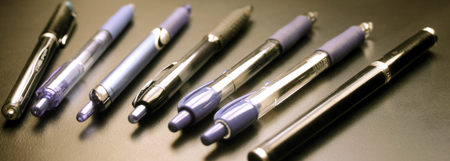
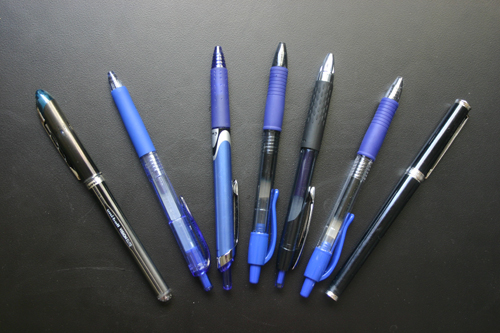
With that in mind, I found the following pens:

pens_2

The contenders include:

* A Uniball Vision Elite Micro .5mm

* A Uniball Signo Gel RT Micro .38mm

* A Pilot Precise V5 RT Extra Fine .5mm

* A Pilot G2 Extra Fine .5mm

* A Uniball 207 Micro .5mm

* A Pilot G2 Ultra Fine .38mm

* The Mont Blanc Extra Fine fountain pen for comparison purposes.

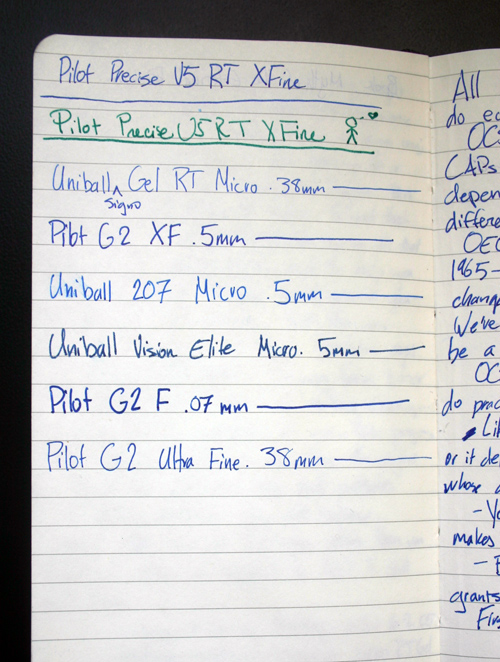
I sought a pen that wrote with a very fine line, had color that didn’t smear or bleed and looked good to me, wrote swiftly and smoothly, and fit my hand. The .38mm pens threw me at first: they seemed like they would be too fine. The following picture shows some of them writing:

notebook_gel_pens_final3

The picture doesn’t convey the thickness of the lines well, but it was obvious that the Pilot G2 Fine .7mm (not pictured among the contenders) was too thick for my purposes. The Pilot Precise wasn’t a gel pen of the sort that seems superior to the others, and the Uniball Vision Elite suffered the same problem: it spread over my moleskine notebook like blood. The Pilot G2 Extra Fine .5mm seemed a tad thick. At the end, I realized that the Signo Extra Micro .38mm, G2 Ultra Fine .38mm, and the 207 Micro .5mm were the best pens of the bunch. Japanese pens seem to be the winners: both Sanford Uniballs and all Pilot pens I tested were made in Japan and seemed to be the best regarded online.

The question: How to choose among them?

I couldn’t decide. All seemed like strong contenders. I didn’t like the 207 Micro housing as much, but it did produce a lovely sky blue color. The Pilot G2 .38mm ultimately seemed darker than I wanted. By process of elimination, I’m going with the Signo RT .38mm for now. For a while I tried swapping the 207 Micro housing with the Signo RT housing, which worked, but I’m not sure I wanted to stay with the .5mm. Thinness counts if I’m going to have any real chance at legibility, and although the .5mm and .38mm were indifferent for most note taking, writing in books with smeary pages made the .38mm shine. I could use one pen for notebooks and another for bound books, but that sounds like more hassle than it’s worth to me. I’ve now been using the Signo RT .38mm for about three weeks, and over the last month I’ve spent about a week with the Pilot G2 .38mm. The two are so close that I could be happy with either, so the .38mm wasn’t far from a coin toss. In the end, I could only pick one.

All the pens survived well. Most packages claimed that the pens would resist alteration. Although I’m not sure what a determined counterfeiter could do, but in these tests by Jet Pens simple water won’t make the ink run. I tried my own test with the finalists and found the same. In addition, Jet says that “The Uni-Ball line is known for its quick drying and waterproof characteristics, making it a favorite among artists.” I’m not an artist, at least in the visual sense, but I do appreciate quick drying and a narrow tip. The Signo RT meets those requirements, and it’s my go-to pen for the foreseeable future.

img_0053-bottom-of-post2

New Kindle, same problems

As seemingly every media outlet has mentioned, Amazon released the Kindle 2.0, and the press fawning is more notable than the gadget itself. To be sure, its stats are impressive, and maybe this one will be better made than 1.0. Its big problem, however, still looms: DRM and software. You don’t own a “book” bought with the Kindle—you have a temporary license for it. If Amazon discontinues the Kindle, or declares bankruptcy, or has any of the myriad of other problems companies are susceptible to, your investment is as solid as the wireless transmission of the book itself.

To quote an earlier post:

Gizmodo tells us that we might or might not be able to resell “books” that have been “purchased” with the Kindle or Sony eBook reader. The scare quotes are intentional because whether the physical embodiment of words or the words themselves constitute a “book” hasn’t been decided, and whether one has actual control over a Kindle or eBook hasn’t been decided either. From my initial comments:

Furthermore, I know that I’ll be able to read my copy of A Farewell to Alms in ten years. Will Amazon still produce the Kindle or Kindle store in ten years? Maybe, maybe not. I have books printed a hundred years ago that have journeyed places I doubt their original owners could’ve fathomed. Most Kindles will end up in consumer electronic junk heaps in five years, just like most iPods.

To be sure, in a few circumstances the Kindle is superior, and Megan McArdle enumerates some here: “I don’t think it’s for everyone, but for a subset of people like me–people who buy a lot of new books every year, so that the half-price books make it cost effective, people who spend a lot of time in transit, and people who travel a lot for work–it’s a godsend.” If you’re moving every six months, or likely to be deployed on a Navy ship or sub, or tend to read any given book only once but read many books per year, the Kindle might be worthwhile. For the rest of us, its End User Licensing Agreement (EULA) makes it terribly unappealing.

IBM Model M / Unicomp Customizer Keyboard update: Mac edition

EDIT: Unicomp now offers a SpaceSaver M keyboard, in which the “M” stands for “Mac.” That’s probably what you want, rather than the Customizer, since the mechanical keys on the SpaceSaver M are the same as they are on the Customizer, while the keyboard itself is considerably smaller and includes Mac-specific keys out-of-the-box.

My Product Review of the Unicomp Customizer keyboard is the most enduringly popular post on this blog, and the last few days have seen an especially large amount of traffic thanks to an NPR story on how an Old-School Keyboard Makes [a] Comeback Of Sorts, which talks about Unicomp. The saddest part: the company is laying off workers because the Customizers and similar keyboards last too long and cost too much. The latter, of course, has a great deal to do with the former, but economic conditions mean that the initial investment apparently isn’t available to many people.

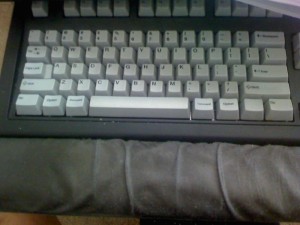
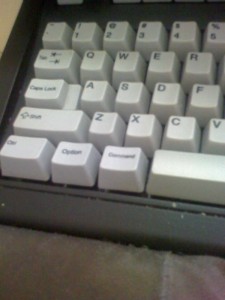
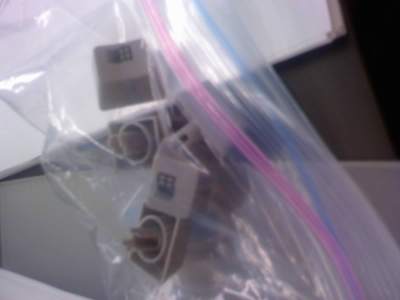
Aside from the durability of its products, Unicomp also has unusually good customer service. I use a Mac and the Customizer ships with Windows keys by default, which one can see in my original post. For $10, however, Unicomp sent me custom keys with “option” and “command” instead of Windows buttons (pardon the fuzzy pictures: I only have a lousy cell phone camera at the moment):

01-31-09_1223

Option and command close up

01-31-09_1225

Perfect: the Windows buttons aren’t staring at me and other people who use my computer aren’t confused (“Hit command-w to close the window.” “Where’s command?” “The one with the Windows logo to the left of the spacebar.” “Huh?”).

Mac users who care about typing, take note: buy a Unicomp SpaceSaver or SpaceSaver M rather than the lousy Matias Tactile Pro 2. You can find Unicomp’s website here.

Computer post: desktop or laptop/notebook?

Ars Technica reports that Global notebook shipments [have] finally overtake[n] desktops, making the issue all the more salient (Slashdot’s coverage is here). Of course, many of those notebooks are probably netbooks that supplement rather than supplant desktops, and the inflated notebook total is probably in part due to the disposable nature and limited longevity of notebooks. Still, the legitimate question remains, and my short answer for most people in most circumstances in “desktop.”

My work demands sustained concentration (see, for example, “Disconnecting Distraction”) and being in spot for a time helps that; I sold my PowerBook and used the proceeds for a 24″ aluminum iMac. It’s a vastly faster machine that’ll probably last longer than an equivalent laptop will and cost less. Those who want mobility pay for it, and I suspect most people overestimate their mobility and underestimate the benefits of a desktop.

But the question is one that an individual is better suited to answer, as it depends on that person’s needs, and I can only enumerate the trade-offs inherent in the laptop/desktop decision. The question becomes almost philosophical concerning the nature of the person you are: more peripatetic or less? Working for longer at a computer or not as long? Used to a large screen or not (becoming accustomed to space and then having it removed it difficult)? Annoyed by cable creep or not? To be sure, some groups of people are well-suited to notebooks: people who move often, have to travel frequently, and students scurrying between dorm and home all probably fit that category. I suspect there are fewer of them than the laptop numbers indicate and that many people don’t consider the detriments, especially ergonomically. I’ve heard the complaint too many times: my wrists hurt, or my back hurts, or my eyes are tired, and they almost always come from laptop users. I recently gave a friend an a Griffin iCurve for her laptop, which seemed to improve the problem. ICurves are no longer made, but the new version is called an Elevator.

An Elevator, external keyboard, monitor, and mouse improves the laptop, but they’re expensive. Comparing Mac equipment makes this delta particularly obvious—even if one buys third-party monitors—as various pricing specials and what not don’t obscure the underlying prices. One person in an Ars thread said, “I’ve found that if you don’t need mobility, paying for it is a bad idea.” Indeed: and the question becomes “need,” which I can’t answer. A Slashdot commenter said that “the lack of replaceable parts is one other reason why laptop sales are ‘higher’ than desktop sales.” Combined with a) the inherent jostling laptops experience and b) the compactness of the parts, raising the temperature inside the machine and increasing the likelihood that subtle manufacturing flaws will do things like pinch video cords or dislodge logic boards, this means laptops are likely to need to be replaced more often, in addition to their higher upfront costs.

I have an iMac, which has some of a laptop’s drawbacks, including no user-serviceable parts aside from RAM. But it’s also relatively easy to move and more likely to last than a ceaselessly mobile laptop. It remains in one place, making it easier to get in the zone, as described by Rands in Repose at the link. Books, mostly fiction but still a few technical ones too, surround my desk, and, like Malcolm Gladwell, I’m more likely to turn to them for quotes, inspiration, and sounding in many circumstances than to the much-scattered Internet:

[Gladwell ….] still prefers to do most of his research at the NYU library. Google is something of a personal hobbyhorse: “Google is the answer to the problem we didn’t have. It doesn’t tell you what’s interesting or what’s important. There’s still more in the library than there is on Google.”

He’s overstating his case but I take his point. Then again, the article also says that Gladwell likes to work in coffeeshops, which is anathema to me: I look every time someone walks by or the espresso machine goes off like a whistle, and at the end of three hours I’ve written as many sentences. There’s even a picture of him sitting at a laptop, perhaps contradicting some of my overall point.

Nonetheless, like most philosophy problems, this one has no perfect answer and is more an expression of underlying value than anything else. Granted, this decision has a greater economic aspect given the continued cost disparity between laptops and desktops, which seems unlikely to disappear in the immediate future. But I think that, if most people weigh what they value, the money and advantages of a desktop more often than not make them better machines. If you’re writing, or coding, or editing movies, or doing any number of other things for a sustained period of time on a somewhat regular basis, a desktop or laptop + external peripherals seems an improvement over a laptop. If you’re chiefly using a computer to read e-mail, check Facebook, and the like, the computer choice probably doesn’t matter. Either way, I’d rather the save money, although many others obviously prefer the mobility. To me, and presumably many others who like to write and to read, and the “deep thought” stage is, to my mind, more important than shallower activities that demand less cognitive attention. That’s not to say you can’t get in the zone or produce useful work on a laptop—millions of people obviously do—but I still think a desktop a more satisfying overall choice.

I can guarantee nothing, of course, and Lord of the Rings speaks to this issue, as it does to so many:

“… The choice is yours: to go or wait.” [Gildor said.]
“And it is also said,” answered Frodo, “Go not to the Elves for counsel, for they will say both no and yes.”
“Is it indeed?” laughed Gildor. “Elves seldom give unguarded advice, for advice is a dangerous gift, even from the wise to the wise, and all courses may run ill. But what would you? You have not told me all concerning yourself; how should I choose better than you? But if you demand advice, I will for friendship’s sake give it.”


EDIT: A recent NPD survey on netbooks found that “60 percent of buyers said they never even took their netbooks out of the house” (hat tip Salon.com). If your laptop never travels, why bother having one?

EDIT 2: I posted a follow-up regarding the relative reliability of desktops versus laptops. The former win according to the best data I’ve seen.

EDIT 3: Marco Arment has a post on why he’s now using a MacBook Pro instead of a Mac Pro. The reason: Solid State Drives (SSDs). The limiting factor on laptop performance for most people used to be the hard drive. With an SSD, it’s not. If you have enough money for a large-capacity SSD and are willing to put a conventional hard drive in the CD / DVD bay, you’re not giving up any substantial performance in day-to-day tasks. More than anything else, the growing power of SSDs make me think the days of desktop computers are limited.

My library on Goodreads

Lily Koppel, author of The Red Leather Diary, invited me to Goodreads, a site dedicated to “what your friends are reading.” I don’t have any Goodreads “friends,” as Facebook fulfills my need for electronic distractions, but I did upload my library—including the vaguely embarrassing stuff, the gag gifts, and the like—for the curious or voyeuristic among you.

I feel no great need to point out what might entail “embarrassing stuff.”


EDIT: I switched the “sort” to “random,” which seems more appropriate. In addition, these are cataloged using Delicious Library 2—I didn’t enter each one by hand.

Life: thoughts on computers and tools

“Walking into Nathan and Kristi’s empty house was a reminder of why stuff doesn’t really matter: We make the inanimate objects come to life, and not vice versa. Similarly, it reminded me that the fond feelings I have for this place are all wrapped up in the people. There was certainly no charm to those bare walls, studded with hooks where pictures once hung.”

—Alan Paul, “The Annual Expat Exodus Never Gets Any Easier

This is an appropriate quote given a friend’s recent e-mail asking if I’d become overly enamored of computers, given what she called an “almost pornographic” shot of my desk. It’s not dissimilar from Faramir’s comment in The Lord of the Rings, when he separates tools from their uses this way in The Two Towers: “[…] I do not love the bright sword for its sharpness, nor the arrow for its swiftness, nor the warrior for his glory. I love only that which they defend […]”

So too I feel about tools, be they computers or pens, or books themselves, which I see not as objects of reverence, but as bulbs that only shed light when read and shared. This could in part be a decadent opinion born of economic opportunity: five hundred years ago, or even fifty years ago, I might not have been so blithe, as books were far more expensive than they are today and have been declining in relative price for almost all of the 20th Century. Regardless of that, I’m lucky enough to live in a time when books are relatively inexpensive; though a book might have symbolic meaning, it is the thing or potential within, not the thing itself, that appeals, and it’s only to the extent that the exterior thing has the potential to manifest what’s within that I’m interested.

New workspace

A year and a half ago, I uploaded a picture of my writing space. Things have changed, and Nigel Beale’s challenge inspires me to post another:

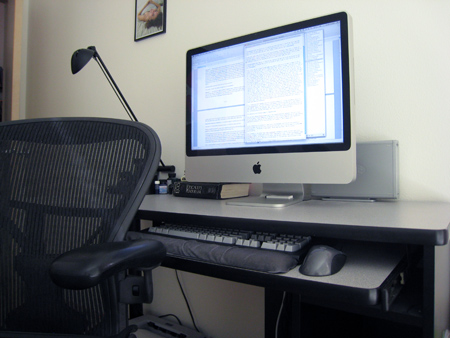
Notable features include an Aeron, the ultimate chair, ink bottles, a backup hard drive used with Time Machine, a gargantuan, wonderful iMac, and a Unicomp Customizer keyboard that inspired this rave—it’s now the most trafficked post on my site.

From Nigel’s blog I went to the Guardian and found out that Alain de Botton has an Aeron too, which obviously enhances the psychic connection established when I shook his hand and discussed Cooper Minis with him in Seattle. His fun novel Kiss & Tell was on my senior year AP English exam.

Notice also the ink bottles hiding between the lamp, book, and base of the computer. I have an anachronistic bend toward fountain pens, and these days I most often use an ink mix of Noodler’s luxury blue blended with Diamine Mediterranean Blue. Juxtaposing inks that Chaucer might have recognized with the computer he probably would not seems an appropriate homage to old and new.

I’d post bookshelves pictures too were my books not substantially packed in preparation for moving.

Product Review: Unicomp Ultra Classic keyboard, or, the IBM Model M reborn

A rash of e-mails regarding my negative review of the Matias Tactile Pro 2 leads me to write this positive review the Unicomp Ultra Classic, which is a modern version of the Model M that IBM used to produce. Dan’s Data explains why these “buckling spring” keyboards are so nice:

The big deal about these old keyboards is their lovely, positive key-click. When you use a keyboard that doesn’t have a good positive click, it’s hard to tell when you’ve depressed a key properly. You have to watch the screen to make sure you don’t leave letters out, or you have to really hammer the keyboard, which is not good for your hands.

Most of the mid-priced keyboards […] use some variant of the “rubber dome” switch technology, which gives a definite little popping sensation when the dome buckles, but doesn’t necessarily give you an actual letter at the exact same moment, thanks to uncertain contacts. The old buckling spring tech absolutely positively does give you the letter when you feel the click. These keyboards feel very much like an old IBM Selectric typewriter – there are plenty of these ironclad behemoths still in service, and they may herniate anyone that has to move them but they’re darn nice to type on.

Today, buckling spring keyboards are never or almost never shipped with computers. Fortunately, Unicomp has accomplished what Matias couldn’t and produced an excellent keyboard in the Ultra Classic, which is based on the actual IBM Model M design. Keystrokes are crisp and precise. The “shadow key” problem that bedeviled the Tactile Pro is absent, and the Ultra Classic itself is solid, recalling a slab of stone (see the picture below), unlike the fragile, mushy keyboards most PCs ship with. It’s also been durable, and in the months I’ve pounded on it the only problem has been a backspace key that became slightly squeaky. I sent an e-mail to Unicomp and someone called me to recommend that I pop off the offending key with a butter knife to reseat it.

If you know anything about modern tech support, reread that sentence and let the shock set in. An actual phone call? From a guy involved with the actual manufacturing of the product? Indeed, and I’ve now experienced my miracle. The squeak seemed to go away and I’m back to my normal pattern. Furthermore, the company is based in Kentucky and makes the Ultra Classics there.

The main drawback for me is that I use an iMac and the keyboard is set up for Windows (EDIT: This is no longer a problem for anyone who chooses the Mac version, which Unicomp now sells, presumably thanks to people like me asking for it). The ability to change key bindings was important to me, and OS X allows it to be accomplished easily by going to System Preferences -> keyboard and mouse -> keyboard -> modifier keys:

As the screenshot shows, I’ve disabled the caps lock key—which is not specific to this keyboard, but just a preference—and changed the “option” key to command and the command key to option, which aligns the Ultra Classic to any other Mac keyboard. Windows and Linux users will probably want to leave the alt and control keys where they are. The Ultra Classic is thus a viable Mac keyboard, which delights me after the Matias Tactile Pro 2 problems. Although I haven’t conducted any tests to demonstrate whether I actually type faster with the Ultra Classic, I feel like I do, and even if I don’t, I like typing on it far more than I do other keyboards.

The Ultra Classic’s minor downsides are fivefold: 1) as described above, the command, alt, and option physical keys don’t match what the computer will actually do; 2) the keyboard has no built-in USB ports, which is a problem with Macs because even the 24″ iMac comes with only three on the back, which is too few; 3) the price, at $69, is somewhat high, but I think the productivity improvement worth the extra cost, and 4) the Ultra Classic probably can’t be used in a work or living situation in which you have to share space with someone else, as the clacking will anger the other person. That last drawback is to me part of the advantage—I like the clack, and to me the noise is part of its fun. Finally, 5) Unicomp doesn’t make a version without the number pad, which is incredibly annoying. Like most people I don’t use the number pad much or need it. The number pad is just wasted, inconvenient space.

My only wish is that Unicomp would make keys with “command” on them, so Mac users could pop the Windows keys off and replace them with a Mac-centric layout. These are minor issues, and the necessary trade-offs weigh heavily in the Ultra Classic’s favor for those who care about their typing experience. EDIT: Unicomp now makes a SpaceSaver M specifically for Macs. The SpaceSaver is identical to the Ultra Classic, except that it’s slightly smaller. If you’re on OS X, it’s the keyboard you want. As I wrote above, it’s too bad Unicomp doesn’t make a version without the number pad. WASD does, so for most people it’s probably a better option.


EDIT: Clarified relationship of the Ultra Classic to the Model M. In addition, you can see the Ultra Classic in my post about new workspace. This post discusses computers, tools, and meaning.

EDIT 2: I did buy Mac-friendly keycaps from Unicomp and wrote about them in this post, which also has pictures of the new keys.

EDIT 3: I wrote a long post on what I think of the the Kinesis Advantage, Unicomp Space Saver, and Das Keyboard two years later.