On the menu bar, there is now a section called “papers” that contains complete copies of academic papers presented at conferences or submitted for publication. The first entry is for The Paradox of Power and Defining Good and Evil in The Lord of the Rings.
Category Archives: Tools
Attachment to paper?
Ars Technica reports on a little noted section of a study on “Digital Entertainment” from the UK:
According to the research, sponsored by UK media lawyers Wiggin, survey data shows books have the highest “attachment” rating of any leisure media activity. People are more attached to their books than they are to their satellite television, radio stations, newspapers, magazines, social networks, video games, blogs, DVDs, and P2P file-swapping. And it’s not like this high rate of affection for the book occurs only among a small group; books came in second only to “listen to the radio” in terms of the number of people who engage in those activities.
Not surprisingly, Ars says that this isn’t good news for the e-book market. Well, the the problem is partially an attachment to paper, but it’s also that the devices aren’t very good yet and the books to actually be read on the devices are encumbered with perfidious Digital Restriction Management (DRM).
A direct link to the survey itself doesn’t seem to be widely available. If anyone sends one, I’ll post it.
Two public-service announcements: Charles Bock and Clearwire
* I saw Charles Bock last night, and though I don’t have time to write in full about the experience, I will say that you should see him if you can. The rest of his tour will only take him to California, Massachusetts, and New York. As if the solid novel, Little Children, and fun Q & A aren’t enough, Bock also gives away swag, including a custom, metallic poster drawn by Chuck Sperry. Alas, I didn’t win one.
Here’s a link to an NPR story on Bock.
* In a rare bit of non-book related news, I have to issue a warning: if you’re thinking about saving $20 a month on Internet access through the aptly named Clearwire, don’t. I say “aptly,” though I mean that rather than having a “clear” meaning “free of any obstructions or unwanted” connection, you’ll have a “clear” as in “frequently does not exist” connection. I made the mistake of ditching cable only to find that Clearwire’s transfer rates in the middle of Seattle, where their coverage is supposed to be phenomenally good, are awful—and often border on dial-up.
Product Review: Kindle
Failures-waiting-to-happen like the Amazon Kindle electronic book are highly frustrating, especially because both it and the Sony eBook suffer from the same problem: how to get books and other material on to the device. In the press and on the web, comparisons to the iPod abound, but they fail because when the iPod was released lots of people already had mp3 files on their hard drives. It was easy to acquire more from existing collections by ripping CDs, so you could, with a minimal amount of effort, load the $500 or whatever you’ve already invested in CDs on the iPod. If you’re a scofflaw, you could load your friends’ CDs too. To most ears, music is nearly identical whether on a CD or compressed to an mp3 (audiophiles: I know you love vinyl for its fidelity or whatever, but I’m talking about everyone else here). Tons of material was already available for the iPod.
Contrast that situation with books. Since I don’t want to read books on my computer screen, I haven’t bothered becoming a digital ruffian and downloading books from peer-to-peer or Bittorrent networks, assuming they are even available. Even though I have a nice shiny iMac with a monitor crisper than 90% of those used in the industrial world I still don’t want to do it. There’s no easy way for me to transfer the 200-odd books Delicious Library tells me I have to a Kindle. They’re a mix of hardcover and paperback, new and used, but I’d be comfortable wagering that their average cost is about $10, and I’m not about to throw that out for a digital reader that, just to get the reader, costs as much as 40 books. Furthermore, I know that I’ll be able to read my copy of A Farewell to Alms in ten years. Will Amazon still produce the Kindle or Kindle store in ten years? Maybe, maybe not. I have books printed a hundred years ago that have journeyed places I doubt their original owners could’ve fathomed. Most Kindles will end up in consumer electronic junk heaps in five years, just like most iPods.
The Kindle functions a bit like public transportation in the sense that public transportation really works when it allows you to live without a car. Likewise, the more paper I need to keep, the worse the Kindle looks. Right now there’s no way for me to easily transfer my subscriptions to The Atlantic and The New Yorker. Amazon isn’t going to have every book I want available, and every book I want that I can’t find and have to buy or check out of the library represents another mark against the Kindle. If you want to read blogs, Amazon acts as a gatekeeper and charges you for the privilege; I like the iMac screen well enough to read blogs that otherwise cost money.
I feel slightly bad writing this, as it shows that I’m susceptible to the Amazon hype machine. But if the hype machine had substance underlying it, I’d be elated. Instead, I’m disappointed, but the Kindle does make me wonder how I’ll be reading thirty years from now; it seems improbable that I’ll use pulped trees. The remaining question is how and when the transition will happen. Maybe someone will come along and give me a free e-book of every regular book in my library. Amazon could do it, and I’d be much more inclined to like the Kindle. Maybe piracy networks will develop, although this seems unlikely given the number of books out there and the difficulty of converting them from bound paper to digital files. Or maybe environmental problems or commodity prices will make printing and shipping books so cost ineffective that we’ll convert to e-book devices for financial reasons. Whatever the cause, I don’t see it happening on a wide basis until a solution for the content problem arrives.
The cave
My cave is where I work and play, and this description of a nerd’s desired habitat is the best I’ve read:
My Cave is my intellectual home. My kitchen is where I eat, my bed is where I sleep, and my Cave is where I think. Everyone has some sort of Cave; just follow them around their house. It might be a garage full of tools or a kitchen full of cookware, but there is a Cave stashed somewhere in the house.
(The link came from Daring Fireball.)
You’ve probably seen my cave: I posted it here, in writing space, although the linked picture is an old one. Follow its links if you want to see where other book nerds operate. I’ll get around to taking a picture of my more recent setup, as the new version is cleaner, faster, less cluttered, features a bigger screen, and cost half as much as the old one. The common elements attributed to the cave are still present, however, as accouterments alone do not make the cave.
New look
Regulars might note the snazzy new look, consisting of an image underlying “The Story’s Story.” Rest assured that the picture is not stock corporate clipart, but rather a genuine section of one of my bookshelves. I chose part carefully using a single criterion: how convenient was it to take the picture as quickly and with as little effort as possible? What you see best fit my requirement. I did have to monkey with a few spines in Photoshop because they were too light for the text—sorry, Proust!—but the books are genuine.
Product review: Matias Tactile Pro 2
I recently tried a product as disappointing as Children of Húrin: the Matias Tactile Pro 2 keyboard, which combined a fat price ($150) with poor build quality (loose keys, a malformed edge, and a continuing shadow key problem). Combined, they make a keyboard worse than the one they supersede—in the words of one reviewer, “[…] It’s 4 steps backwards, one step sideways, and 0 steps forward.”
I type a lot, as implied here, and so spend a greater-than-average amount of time thinking about my keyboard. When I heard about the Tactile Pro 2, I sent an e-mail to Derek Trideja, who gave me the title “Alert keyboard fetishist.” An exaggeration, but not far from the truth, and I’ve yet to find that perfect keyboard. Frequent readers will remember when I posted a picture of my writing space—since changed—and the Matias Tactile Pro Keyboard version 1 that peaks out. It’s as close as I’ve come to the perfect keyboard, and if not for the shadow keys problem it would be. Seventy nine dollars was a lot for a keyboard until I began using it regularly, and I found this one much better than the mushy keyboards that most computers come with, or the new and hideous keyboard that came with my iMac.
Programmers sometimes raved about old school IBM Model M keyboards, but the regular ones were discontinued in 1996 and don’t have an easy place for command, option, and control keys, making them poorly suited for OS X. The Tactile Pro 1 filled that gap because it had a Mac layout and the comfort I want. Shadow keys, however, develop when the writer hits a number of keys in succession—apparently the keyboard has multiple keys on the same path in some instances, which can cause characters to appear even when the user doesn’t press them. Problems occur when you type anything ending in “ion”, like “division,” which appears as “divisioqn” if you strike the keys in rapid succesion. Not fun, but still better than the mushy keyboards.
Version 2 still has those problems, although they’re not as pronounced. In an e-mail to me, someone from Matias said that the shadow key problem had been reduced in version 2. The person was right, but it hasn’t been reduced enough. In addition, the USB port situation irritated me—the old version has one cable and two USB ports, one on each side of the keyboard. The new one has a single USB port on the side of the keyboard and two ends, as depicted here:
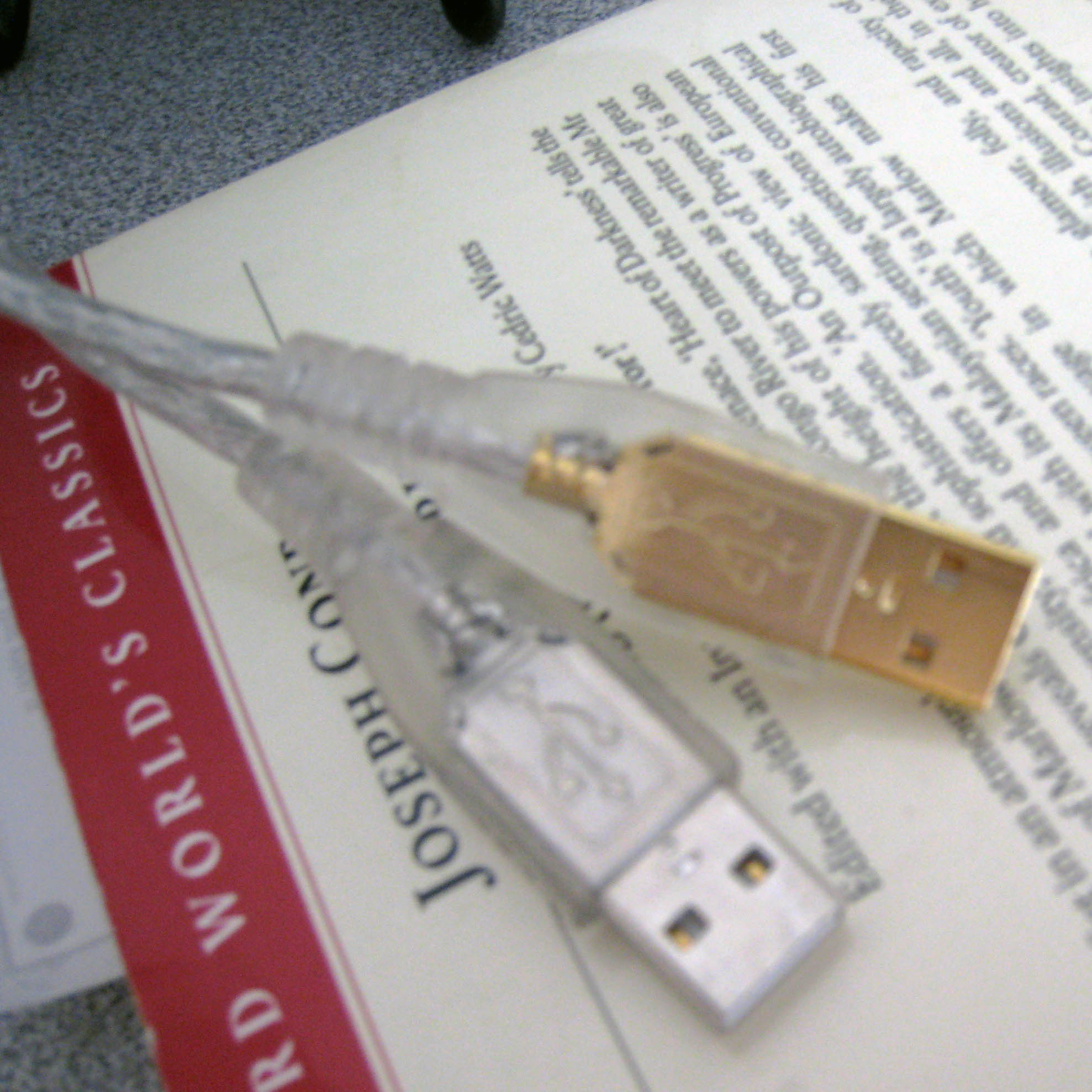
(Notice the background: an Oxford edition of Conrad’s Heart of Darkness and Other Tales.)
This causes me to run out of USB ports on the back of my computer and to have to continually unplug things if I want to download pictures or transfer files to a USB drive. Their marketing materials don’t mention that they’ve lost one USB port on the keyboard. In addition, the one I received has keys much looser than my previous Tactile Pro—it feels flimsier and doesn’t have the same satisfying action with each keystroke. The front edge was also malformed, as this picture shows, though not perfectly:

I was tempted to return mine and ask for a replacement unit, but after reading this thread on Ars Technica and the previously mentioned Bronzefinger review I decided not to bother. I’d rather just have the money back, and one thing Matias does offer is a 30-day money-back guarantee. I’m sure that the writer of Bronzefinger and I are not the only ones to have made use of this policy. The keyboard feels more like something hacked together by electrical engineering students one weekend or a science fair project.
What went wrong? I have no idea. I’ve heard engineering friends say that late projects seldom bode well for the finished project, which is more likely to turn out poorly because the delay manifests underlying problems; I’ve read similar things on Slashdot, for what their opinion is worth. The Matias Tactile Pro 2 was supposed to ship in March, but the initial batch didn’t arrive until, as far as I could tell, June, and the one I bought came from the second run that shipped in September. If Matias hasn’t worked the kinks out yet, I’m not sure they will in this iteration. In the meantime, those interested in a better keyboard might want to try and snag a used Tactile Pro 1 or a reborn Model M. The Tactile Pro 2 does have a few stronger points, like an optimizer feature that allows one to change the keyboard layout, but its benefit is minor compared to the keyboard’s drawbacks.
In other technology news, Apple just announced the latest versioqn—excuse me, version—of OS X, Leopard. I’ve also started using iWork, and especially Pages, for some of my writing. Pages simply looks nicer than Word, even if Pages is still missing many features.
EDIT: I posted a review of the Customizer, which is the new version of the Model M mentioned above.
 The Story's Story
