Further thoughts on the Kinesis Advantage, Unicomp Space Saver, and Das Keyboard—two years later

EDIT: Since writing this, I’ve switched, as of 2023, to a Kinesis 360 keyboard. Someone who wants to try a Kinesis keyboard more cheaply should check eBay and sell the keyboard to someone else if it doesn’t work out.

The series of reviews I wrote in my search for the perfect keyboard continue to rack up dozens or hundreds of hits per week; the most extensive posts cover the Kinesis Advantage, Unicomp Customizer / Space Saver, and the Das Keyboard. The Unicomp review in particular has become a repository for thoughts on the keyboard, with 60 comments so far and new ones popping up regularly.

By now I’ve spent two years using the Advantage as my primary keyboard, and since then people have e-mailed me an array of questions about it. The latest comes from a guy who is curious about how it compares to the Das Keyboard, especially regarding the key switches, and whether his size (at more than 6′ 7″) might make the keyboard impractical.

The keys on the Kinesis Advantage are “Cherry Brown” switches, and those on the Das Keyboard are “Cherry Blue” switches (if you didn’t see the Das Keyboard Review, look now, especially at the video). There’s some difference between the Browns and Blues, but I think if you gave me the Coke-Pepsi challenge by blind-folding me, putting a keyboard with Browns under my fingers and then swapping it for an identical one with Blues, I doubt I’d care, apart from the Blues being nosier. In terms of feel, they’re a distinction without a difference.

If you said, “Here’s a Kinesis Advantage with Model M-style buckling springs,” I’d take it. But the difference between the buckling springs and Cherry switches is slight at this level of quality. It’s like the Nikon, Canon, and Sony camera aficionados duking it out over recent DSLRs. The differences between Canon’s Rebels and the Nikon’s  consumer “D” series cameras are marginal. Most people wouldn’t notice. And since most pictures are being shrunk for Flickr or Facebook anyway, the importance of marginal quality improvements declines further.

I’ve used the Advantage close to every day for years, and I can’t see or feel any difference in the keys over time. Normal keyboards, like the ones that ship with generic desktop computers, get “sticky” or otherwise problematic after a lot of use. This one doesn’t. Searching for “Kinesis Advantage longevity” and similar strings (like durability) doesn’t bring up any horror stories. The Advantage doesn’t have the extreme reputation that IBM Model Ms have, but Kinesis also hasn’t been making them since the 1980s and the Advantage is, by its cost and the commitment necessary to retrain yourself, a much more niche product.

I’m 6’1″, not 6’7″, but I don’t very tall guys are likely to have problems with the Kinesis. Maybe if you have Shaq-size hands you might need or want larger keys, but that’s a niche case. My elbows aren’t turned in at all when I use the Advantage; yours might have to slightly, if you’ve got especially broad shoulders, but again, I don’t think the effect will be too pronounced. I’ve also seen women as short as 5’4″ use the keyboard (note: this is not a euphemism) without any obvious ergonomic problems.

Anyone having trouble with wrists, should get a desk / chair combination that keeps the elbows at a 90 degree angle, likely via a sit-stand desk. The top of the screen should be at your eye level. I have three books stuck under my iMac, lifting the screen to the desire height, and a Humanscale Keyboard tray to accomplish this. If you’re using a laptop and it spends most of its life in one place, try to get an external monitor, and get the external monitor at the desired height, or buy a laptop stand (the Griffin Elevator is popular). This might not be practical or might be too expensive, depending on where you work, but if you can do it you’ll have a better overall experience. Just adjusting the height of your monitor and chair might do more for you than a very expensive keyboard.

EDIT: There’s a worthwhile Hacker News discussion about this essay; sometimes HN will generate thousands of visitors who leave virtually no comments, because they comment on HN itself. The top two comments say the Kinesis Advantage is quite durable, and both people report that they’ve keyboards for more than ten years. One says Kinesis will repair keyboards that’ve been caught “drinking” soda. They allay the longevity worry, especially if Kinesis offers service. It would be a major bummer to have to re-buy a $300 keyboard every five years because it breaks, but $300 also buys high-quality keys that can take a lot of clacking.
Eight years of writing and the first busted Moleskine

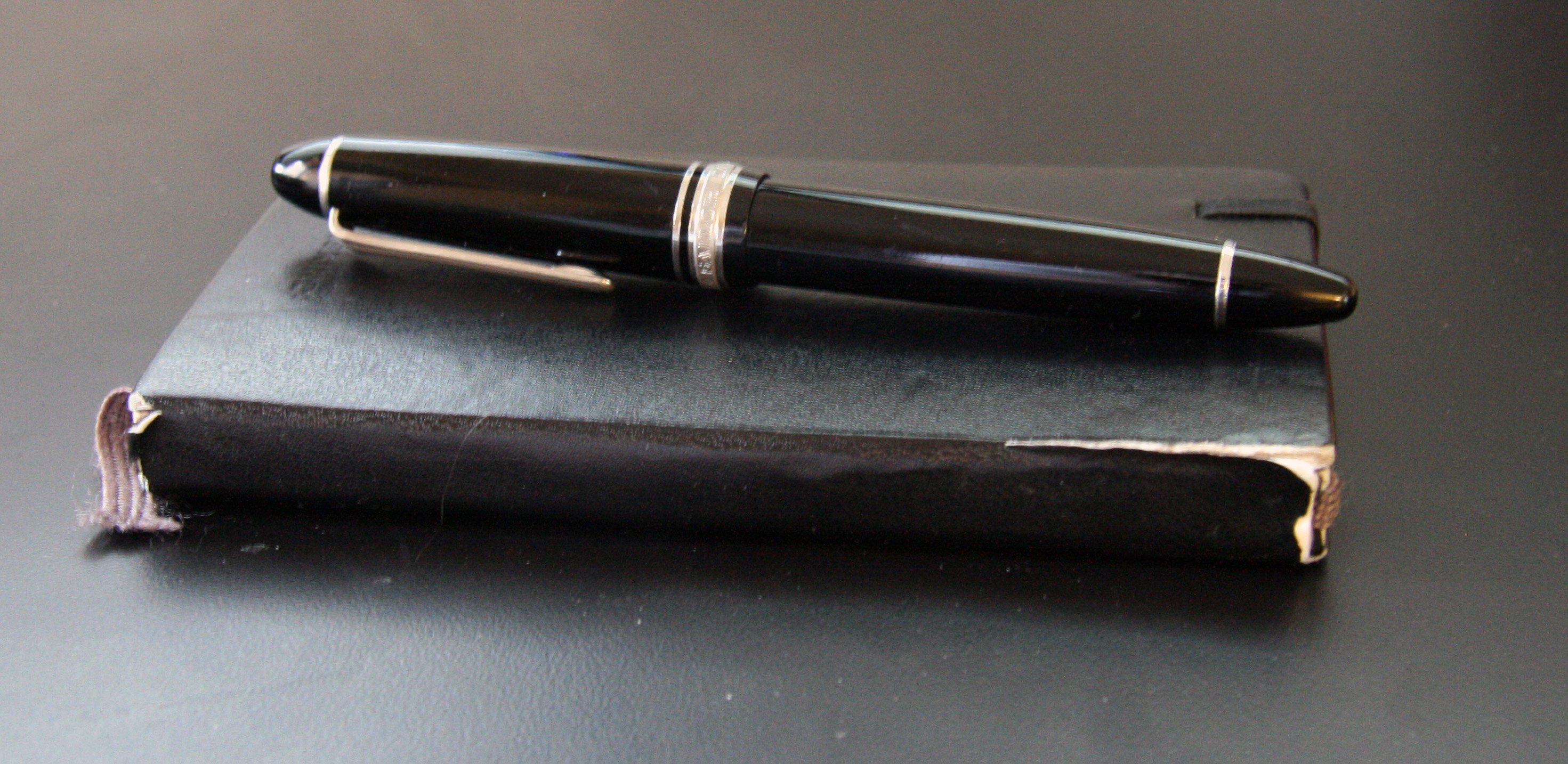
Most of my writing happens on a computer, which means it’s pretty hard to depict the final product in a visually satisfying way.* But I also carry around a pretentious Moleskine™ notebook for the random ideas that strike in grocery stories or at parties. The latest notebook, however, developed a split binding:

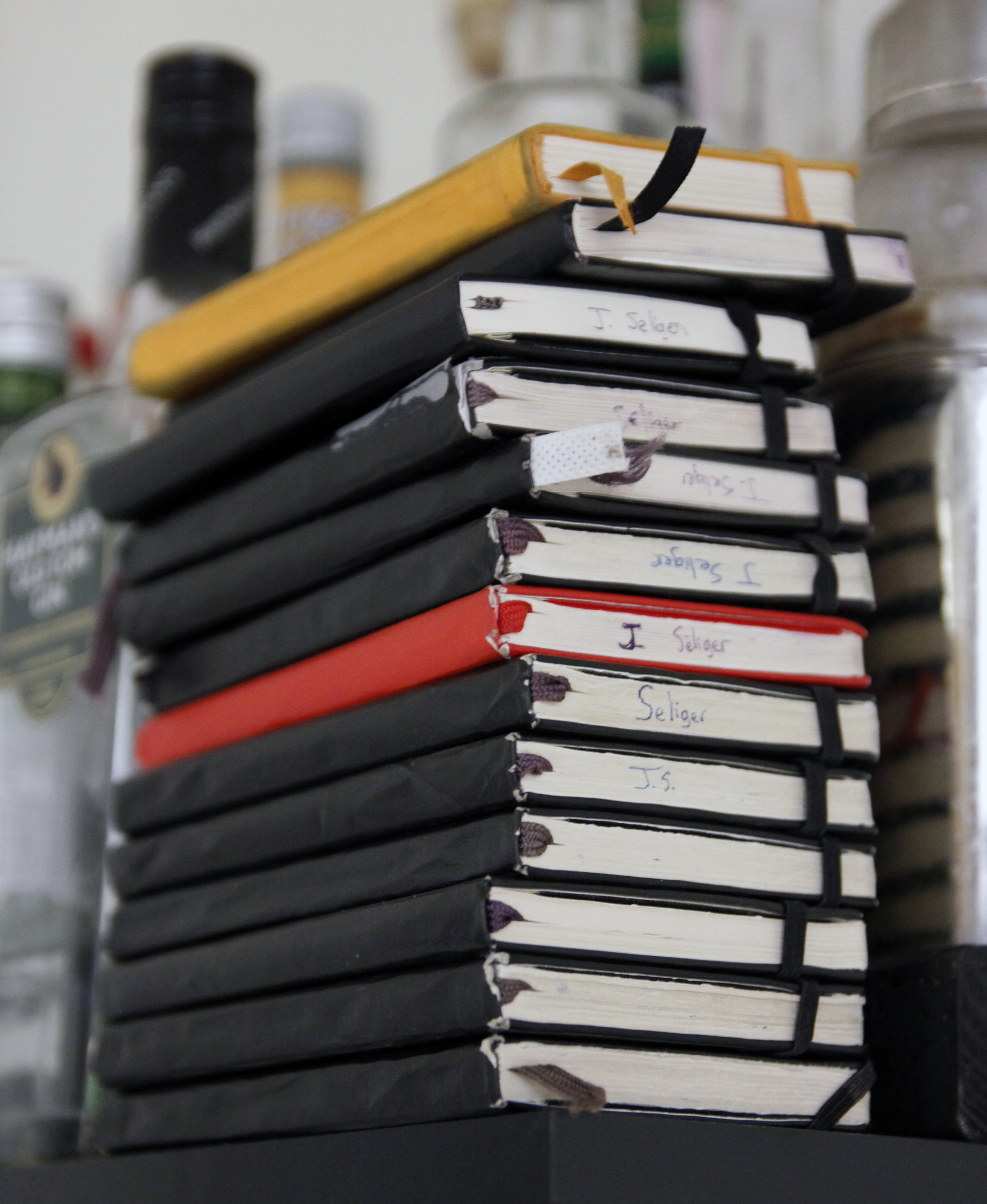
I’ve been using Moleskines for about eight years, which means I go through about two of them per publishable novel:

Notice how none of the others have the binding split that afflicted the latest one. I haven’t consciously treated this one differently from its predecessors or used it any longer. Maybe the quality control at Moleskine central has declined, although people have made claims in that direction for a very long time.

Regardless of the reason, the latest notebook has about twelve usable pages left; I tend to write nonfiction, blog post ideas, things I need to remember, reminders about e-mails, entries from an unkept diary, and stuff like that in the back. Ideas, quotes, things people say, and other material related to fiction goes in front. When back and front meet in the middle, it’s time to get a new one.

When I start working on a new novel, I usually go back through all the old notebooks at the beginning to see what material might be usable and when I started taking ideas for that specific project. Some ideas for novels have been burbling in the back of my mind for a very long time, waiting for me to have the time and skill to move them from a couple of scrawled lines to 80,000 words of story. The oldest Moleskines I have were bought in the 2002 neighborhood. They’ve held up pretty well; the ones I started buying in the 2005 neighborhood are showing their age. Tough to say if this is an indication of falling quality control or something else altogether.

While Googling around for the complaint about Moleskine quality I linked to above, I also found a site that recommends The Guildhall Notebook. I’ve already ordered one, although apparently Guildhall doesn’t have a U.S. distributor, so I have to wait for mine to ship from the UK. I hope the improved binding is worth the wait. EDIT 1: They weren’t worth the wait, or the hassle; if that weren’t enough, Christine Nusse of Exaclair Inc. /Quo Vadis Planners, which distributes or distributed Guildhall notebooks, said in an e-mail that her understanding is that the notebooks are being discontinued. She recommends the Quo Vadis Habana instead (although I think it too big) or a Rhodia notebook (which I think just right, as I said below.

So even if you want a Guildhall pocket notebook, you probably won’t be able to find one for long; fortunately, the Rhodia Webbie is a better alternative.

EDIT 2: Someone found me by asking, “are moleskines pretentious”? Answer, in post form: “Are Moleskines pretentious? Yup. Guildhall Notebooks are worse.”

EDIT 3: I’ve settled on the Rhodia Webbie as a full-time notebook: it’s expensive but much more durable than other notebooks I’ve found. I’ll write a full review at some point.

EDIT 4: I posted an updated photo of the stack. Or you can see it here:


* Even describing it using conventional prepositions is tough: do I write “on” or “in” or “with” a computer? Good arguments exist for any of the three.

Will we ever find out what happened to Flip Video?

According to the San Francisco Chronicle, “Cisco Killed The Flip Cam A Day Before It Was Going To Get A Cool New Live Broadcast Feature.” Which is pretty frustrating: why kill the unit right before a major upgrade that’s presumably all sunk costs? The WSJ has one possible answer in “After Cisco Sacrifices His Baby to the Gods of Wall Street, Flip Founder Jon Kaplan Speaks!“, where Kara Swisher says that axing Flip was an “effort to assure Wall Street that it was no longer serious about its wacky foray into the consumer market.” But does it have to be so public? So symbolic?

And it is symbolic: Arik Hesseldahl points out that Cisco lumps the revenue from Flip into an “other” category on its financial statements. He then goes on: “This ‘other revenue’ totaled $2.6 billion in Cisco’s fiscal 2010, up from $1.6 billion in fiscal 2009. The biggest single factor for that billion-dollar boost was $317 million in Flip camera sales. You read that right: Cisco just shut down a business that brought in $317 million in sales in its last fiscal year.”

He says, “Make no mistake, the Flip was and is a culturally significant product.” It was, and, as regular readers know, I almost never write about consumer gadgets because most of the time there’s no point and people who write about them are just wasting their breath. But the Flip was fun in that shocking, surprising way that the original iPods were. Gadgets rarely have that effect—they’re as rare, or maybe rarer, as a book that really speaks to me. But a book is forever while gadgets come and go.

I think it’s the pointlessness of closing Flip that annoys me so much. They made a fun product that a corporate leviathan is killing just because it can. Unfortunately, posts like this one aren’t likely to have much of an effect. There’s a Facebook page devoted to saving Flip, but it only has 407 members as of this writing, and, in Cisco terms, that’s indistinguishable from zero.

Still, David Pogue’s post “The Tragic Death of the Flip” has 13 pages of comments, most from people with the same reaction I did. Killing a beloved product is counterproductive, considering how hard it is to develop and sell a beloved product, and I still wonder why Cisco axed instead of sold the company. A hundred million dollars is presumably better than zero. But I’m not sure we’ll ever find out.

EDIT: Some feedback points out that still-video hybrid cameras like Panasonic’s will likely take over Flip’s market. Could be, but I think the two serve different people. Those Panasonic cameras are a lot more expensive and in key ways less fun to use. I have a Canon camera for pictures and while it’s great for what it is, Flips are more approachable and more portable.

How many people does it take to recycle a CFL lightbulb?

I bought my first CFL yesterday. Because I’m the kind of person I am, I read the package and noted the command to give spent bulbs to a recycling center because the bulbs contain a very small amount of mercury. The packaging directed me to Lamprecycle.org, which is slightly more friendly than 1998-era websites, but not by much. If you want to find out where a local recycling center is, you have to click a large box that brings you to yet another website, this one called earth911.

Then you have to make yet another pair of decisions: write the kind of thing you want to recycle and your zip code. Only then do you actually get a list of places (but no map).

If whatever industry consortium is behind Lamprecycle.com actually wanted you to recycle your lightbulbs, they would a) tell you that Home Depot and Lowe’s both accept CFL recycles and b) they would give you a website that offers a single text box with a zip code in it. Type your zip code, find the nearest recycling centers. Each hoop means more people will say “whatever” and not bother. That, of course, is probably precisely the point: makers of CFL need PR cover but probably don’t want to have to pay for disposal.

I became more attuned to these kinds of design questions after reading The Design of Everyday Things, which is about meatspace, not the digital world, but offers lessons that often apply to the online world too. One is this: you should make things as easy as possible for the people using your product, whatever it may be, and “easy” is often surprisingly precise. In this case, it means bringing the random joe who goes to your site to a recycling center as fast as possible. And, assuming Home Depot and Lowe’s keep accepting CFLs, you don’t even need the Internet, or at least not as a primary information distribution mechanism.

This is probably about as effective as complaining about Grants.gov, but the broader lesson is still an important one: make things easy for your users / readers. And if you’re running a major site, consider getting someone to edit it; I don’t take it as a good sign when the English is this bad on the “Earth911” site: “Sealed within the glass tubing of CFLs, is a very small amount of mercury.” Native English speakers would normally write, “A very small amount of mercury is sealed in the glass tubing of CFLs.” But if the site is not primarily to inform, you wouldn’t care about that sort of thing.

Scrivener or Devonthink Pro, with a side of James Joyce’s Ulysses

James Fallows’ post about the writing program Scrivener “suggests broader truths about the ways computers help and hinder the way we think.” He’s right, although I’ve used Scrivener and didn’t love it enough to switch: for anything beyond blog posts I mostly use a combination of Microsoft Word and Mellel, a word processor that is very fast and stable but can’t track changes. This, for me, is not merely bad: I can’t use Mellel beyond first drafts.

The other problem with Mellel isn’t related to the program itself, but to the release cycle. It’s discouraging when a forum post from the developer says, “Yes, we have been slacking off. The pace of development of Mellel – that is, the number of new releases – have dropped significantly over the last three years.” That’s another way of saying, “We’re not really working on it.”

Word, in turn, gets used for any documents I have to share with others (since they already have Word).

Fallows describes how Scrivener offers “a ‘project’ organization system that makes it easy to amass many notes, files, quotes, research documents, etc related to the essay or article or book you’re writing.” I primarily use Devonthink Pro (DTP) for this kind of purpose, and it connects whatever ideas I have to other quotes, ideas, and the like. The “artificial intelligence” engine is surprisingly useful at making connections that I didn’t realize I had. Obviously I could use DTP with Scrivener, but the use of DTP makes the marginal value of Scrivener somewhat lower.

Scrivener 2.0, however, is intriguing; these videos demonstrate its power. More on that later, as I’d like to follow-up on the idea that computers can “help and hinder the way we work.” Scrivener enables one to rearrange large chunks of materials easily, which is how a lot of writers work in the off-line world. For example, I’ve been reading Critical Essays on James Joyce’s Ulysses for a seminar paper and came across this description of Joyce’s process in A. Walton Litz’s “The Design of Ulysses:”

[Joyce] did not write Ulysses straight through, following the final order the episodes. First it was necessary to determine the design of the novel, to visualize its characters and the course of the action, and this entailed putting scattered portions on paper in order to clarify them. Then, like the mosaic worker, Joyce collected and sorted material to fit the design. Finally, the fragments were placed in their proper positions through a process of rough drafts and revisions.

The “design” and the ability to “visualize its characters and the course of the action” corresponds roughly to Scrivener’s idea pane. The “scattered portions on paper” come next so they can be rearranged, “collected” and “sorted.” There’s nothing wrong with using pieces of paper, of course—it worked for Joyce!—but I wonder what the great novelist would think of working digitally.

Joyce used notecards, and Litz liked the mosaic-worker analogy so much that he uses it again a few pages later:

It was the function of the note-sheets to assure that patterns and relationships already visualized by Joyce reached their fore-ordained positions in the text. Like the mosaic worker, he was continuously sorting and re-grouping his raw materials, assigned each fragment to its proper place in the general design. The mechanical nature of this process emphasizes the mechanical nature of those ordering principles which give Ulysses its superficial unity [. . . ]

I used to write more like this and now I write less like this: it is often my goal to ensure that each chapter follows inexorably from the preceding chapter. The narrative threads and the desires of each character should force the novel in a particular direction. If I can rearrange the chapters relatively easily, then I feel like I’ve done something wrong. I still want “patterns and relationships” to reach conclusions, but I don’t want those conclusions “fore-ordained:” I want them to arise organically, and for them to be inevitable yet surprising. This is a difficult trick to pull off, but it means that the serial nature of the writing I do is probably less likely to be helped by the structure of Scrivener than the writing some others might do.

In the essay after Litz’s, Anthony Cronin’s “The Advent of Bloom” begins with the structure of Ulysses: “[. . .] if Ulysses can be said to have a plot, its plot is formless and does not give form to the book – it is not shaped to produce a series of dramatic sensations for purposes aesthetic or otherwise; it has no conclusion in event, only a termination in time [. . .]” If a plot “does not give form to the book,” then something must; for some writers, Scrivener might organize it and help find a way to present formlessness. The program helps one create a mosaic, but I’m not trying to create a mosaic in my work, at least right now: I’m trying to create a linear plot. So I don’t think the program will help me as much as it could.

Nonfiction books, on the other hand, might be much better with Scrivener: in my papers, I move material around much more frequently than I do in fiction. Since I haven’t written any nonfiction books, however, I can’t comment as much on those.

I suspect that large, high-resolution monitors enable programs like Scrivener: at 24″ or larger, one can have a broad enough swatch of material open to really make a (computer) desktop feel like a (physical) desktop. You can layout and rearrange items much more easily. The new 27″ iMacs in particular are appealing for this purpose, and one can now find 27″ external monitors from Dell, Apple, and others. As desktops become more like desktops, being able to visualize large amounts of information at once makes tools like Scrivener more useful.

At the moment, I’m about 80K words into a novel that I think will end up in the neighborhood of 100K – 110K words, which is a bit long for a first published work but not impossibly long. Using a 24″ iMac, I can easily have two pages of text open at a time, which is very convenient. That’s what I use for my “notes” section (miscellaneous stuff I want to remember but can’t immediately add to the main narrative) and my main window, which has the novel progressing from Chapter 1 to “### END ###.” On my second monitor, a 20″ cheapie Dell, I have an outline and character list open.

Some of those functions could be taken over by Scrivener, based on what I’ve seen in the videos. For my next novel—if there is another in the immediate future; I need to devote more time to academic writing—I’d be willing to try Scrivener long enough to know if version 2.0 is a good fit. For this one, however, the thought of changing tools in the middle of the process would be too disruptive. There’s no reason, after all, that I can’t use both Scrivener and Devonthink Pro.

Scrivener or Devonthink Pro, with a side of James Joyce's Ulysses

James Fallows’ post about the writing program Scrivener “suggests broader truths about the ways computers help and hinder the way we think.” He’s right, although I’ve used Scrivener and didn’t love it enough to switch: for anything beyond blog posts I mostly use a combination of Microsoft Word and Mellel, a word processor that is very fast and stable but can’t track changes. This, for me, is not merely bad: I can’t use Mellel beyond first drafts.

The other problem with Mellel isn’t related to the program itself, but to the release cycle. It’s discouraging when a forum post from the developer says, “Yes, we have been slacking off. The pace of development of Mellel – that is, the number of new releases – have dropped significantly over the last three years.” That’s another way of saying, “We’re not really working on it.”

Word, in turn, gets used for any documents I have to share with others (since they already have Word).

Fallows describes how Scrivener offers “a ‘project’ organization system that makes it easy to amass many notes, files, quotes, research documents, etc related to the essay or article or book you’re writing.” I primarily use Devonthink Pro (DTP) for this kind of purpose, and it connects whatever ideas I have to other quotes, ideas, and the like. The “artificial intelligence” engine is surprisingly useful at making connections that I didn’t realize I had. Obviously I could use DTP with Scrivener, but the use of DTP makes the marginal value of Scrivener somewhat lower.

Scrivener 2.0, however, is intriguing; these videos demonstrate its power. More on that later, as I’d like to follow-up on the idea that computers can “help and hinder the way we work.” Scrivener enables one to rearrange large chunks of materials easily, which is how a lot of writers work in the off-line world. For example, I’ve been reading Critical Essays on James Joyce’s Ulysses for a seminar paper and came across this description of Joyce’s process in A. Walton Litz’s “The Design of Ulysses:”

[Joyce] did not write Ulysses straight through, following the final order the episodes. First it was necessary to determine the design of the novel, to visualize its characters and the course of the action, and this entailed putting scattered portions on paper in order to clarify them. Then, like the mosaic worker, Joyce collected and sorted material to fit the design. Finally, the fragments were placed in their proper positions through a process of rough drafts and revisions.

The “design” and the ability to “visualize its characters and the course of the action” corresponds roughly to Scrivener’s idea pane. The “scattered portions on paper” come next so they can be rearranged, “collected” and “sorted.” There’s nothing wrong with using pieces of paper, of course—it worked for Joyce!—but I wonder what the great novelist would think of working digitally.

Joyce used notecards, and Litz liked the mosaic-worker analogy so much that he uses it again a few pages later:

It was the function of the note-sheets to assure that patterns and relationships already visualized by Joyce reached their fore-ordained positions in the text. Like the mosaic worker, he was continuously sorting and re-grouping his raw materials, assigned each fragment to its proper place in the general design. The mechanical nature of this process emphasizes the mechanical nature of those ordering principles which give Ulysses its superficial unity [. . . ]

I used to write more like this and now I write less like this: it is often my goal to ensure that each chapter follows inexorably from the preceding chapter. The narrative threads and the desires of each character should force the novel in a particular direction. If I can rearrange the chapters relatively easily, then I feel like I’ve done something wrong. I still want “patterns and relationships” to reach conclusions, but I don’t want those conclusions “fore-ordained:” I want them to arise organically, and for them to be inevitable yet surprising. This is a difficult trick to pull off, but it means that the serial nature of the writing I do is probably less likely to be helped by the structure of Scrivener than the writing some others might do.

In the essay after Litz’s, Anthony Cronin’s “The Advent of Bloom” begins with the structure of Ulysses: “[. . .] if Ulysses can be said to have a plot, its plot is formless and does not give form to the book – it is not shaped to produce a series of dramatic sensations for purposes aesthetic or otherwise; it has no conclusion in event, only a termination in time [. . .]” If a plot “does not give form to the book,” then something must; for some writers, Scrivener might organize it and help find a way to present formlessness. The program helps one create a mosaic, but I’m not trying to create a mosaic in my work, at least right now: I’m trying to create a linear plot. So I don’t think the program will help me as much as it could.

Nonfiction books, on the other hand, might be much better with Scrivener: in my papers, I move material around much more frequently than I do in fiction. Since I haven’t written any nonfiction books, however, I can’t comment as much on those.

I suspect that large, high-resolution monitors enable programs like Scrivener: at 24″ or larger, one can have a broad enough swatch of material open to really make a (computer) desktop feel like a (physical) desktop. You can layout and rearrange items much more easily. The new 27″ iMacs in particular are appealing for this purpose, and one can now find 27″ external monitors from Dell, Apple, and others. As desktops become more like desktops, being able to visualize large amounts of information at once makes tools like Scrivener more useful.

At the moment, I’m about 80K words into a novel that I think will end up in the neighborhood of 100K – 110K words, which is a bit long for a first published work but not impossibly long. Using a 24″ iMac, I can easily have two pages of text open at a time, which is very convenient. That’s what I use for my “notes” section (miscellaneous stuff I want to remember but can’t immediately add to the main narrative) and my main window, which has the novel progressing from Chapter 1 to “### END ###.” On my second monitor, a 20″ cheapie Dell, I have an outline and character list open.

Some of those functions could be taken over by Scrivener, based on what I’ve seen in the videos. For my next novel—if there is another in the immediate future; I need to devote more time to academic writing—I’d be willing to try Scrivener long enough to know if version 2.0 is a good fit. For this one, however, the thought of changing tools in the middle of the process would be too disruptive. There’s no reason, after all, that I can’t use both Scrivener and Devonthink Pro.

If I were a movie studio, I’d make streaming a priority — based on a recent experience with Assholes Finish First

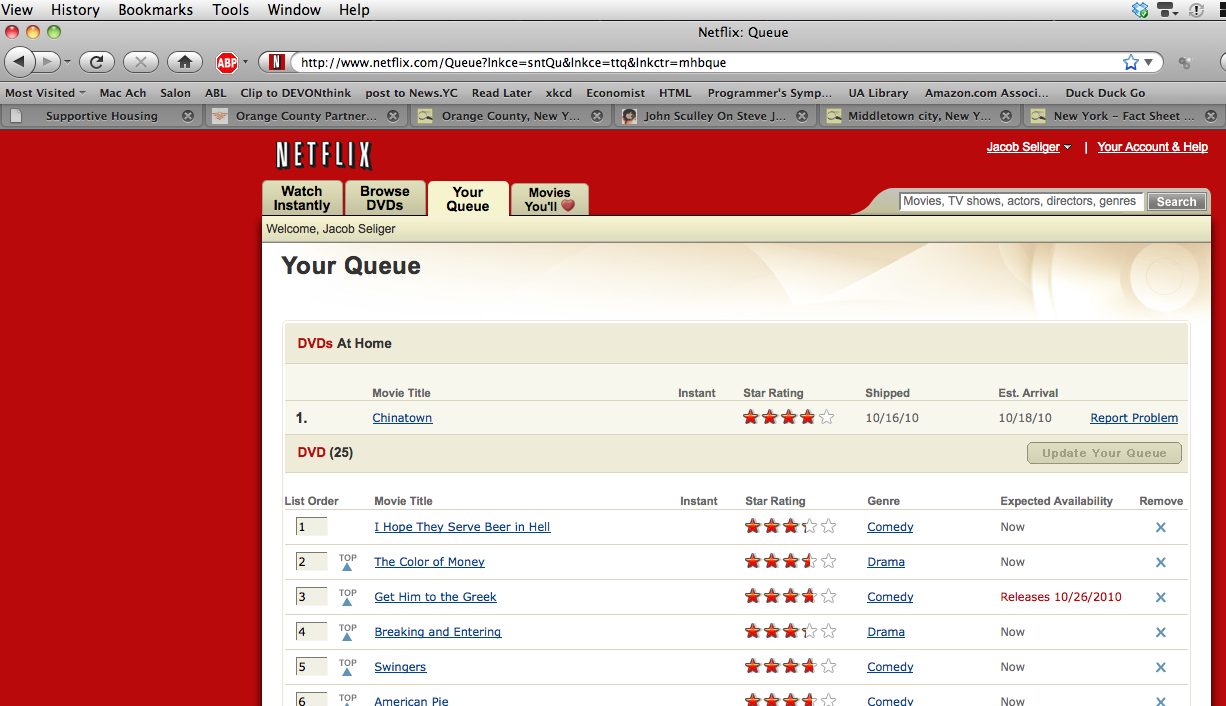
I recently interviewed professional writer and asshole Tucker Max about his second book, Assholes Finish First. He also wrote I Hope They Serve Beer In Hell, which was made into the eponymous movie. Like any diligent journalist, I wanted to get as much background on his work as I could—including the movie, which I put on my Netflix queue without enough time to get it. My queue looked something like this the day before the interview:

Notice the little buttons that say “Play” (EDIT: Oops: the movies at the top of my queue don’t have that button. Take my word for it: some do, and they play immediately). If I want to watch those movies, they automagically play via Microsoft Silverlight, which is probably just a nefarious and tardy attempt to compete with Flash but which I installed because it was there and easy. Notice that there isn’t a button that says “Play” next to I Hope They Serve Beer in Hell. But I was interviewing Tucker and couldn’t wait.

So I searched for I Hope They Serve Beer in Hell using a BitTorrent search engine that will remain unidentified here but is easily found using conventional search engine tools. Sure enough, it had a copy of I Hope They Serve Beer in Hell. A few clicks later and it began downloading. Two or three hours later and it was done. The quality wasn’t especially high—it was compressed all the way down to 700 MB—and the process wasn’t as smooth as clicking “play” and starting the stream. But it worked reasonably well. If I were the kind of person I was in high school, when I didn’t have a credit card but did have Internet access, I might have done a lot more of this. And if I were a less, uh, scrupulous person, I’d been tempted to just go the BitTorrent route all the time.

Apparently others have noticed this general trend—in “Why Is Netflix Disclosing Less About Its Business?” for The Atlantic, Jonathan Berr writes:

According to Netflix, 66 percent of subscribers instantly watched more than 15 minutes of a movie or a TV episode in the third quarter compared with 31 percent in the year-ago period and 61 percent in the second quarter. This underscores the company’s transition from DVD rentals to streaming video.

If I were a movie studio, I’d be trying to make sure that what happens to me is different from what happened to the music business. I’d be doing everything I can to make sure that my movies were available on Netflix, the iTunes store, Amazon, Barnes and Noble, Bob’s crab shack, whatever. Available and easy. In “The Other Road Ahead,” Paul Graham says, “Near my house there is a car with a bumper sticker that reads “death before inconvenience.’ ” That’s basically how I feel much of the time.

And I’m not the only one (who feels like streaming is handy):

[. . .] Netflix accounts for 20 percent of downstream Internet traffic during peak home Internet usage hours in North America. That’s an amazing share—it beats that of YouTube, iTunes, Hulu, and, perhaps most tellingly, the peer-to-peer file-sharing protocol BitTorrent, which accounts for a mere 8 percent of bandwidth during peak hours. It wasn’t long ago that pundits wondered if the movie industry would be sunk by the same problems that submarined the music industry a decade ago—would we all turn away from legal content in favor of downloading pirated movies and TV shows? Three or four years ago, as BitTorrent traffic surged, that seemed likely. Today, though, Netflix is far bigger than BitTorrent, and it seems sure to keep growing.

If Netflix wants to stay bigger than BitTorrent, however, the movie studios need to climb aboard. If they’re smart, they will. If not, they have predecessors who have been massacred by the Internet, and they no doubt will have successors who are too.

Oh, and the movie? It’s not very good. Skip it and read the book.

Where Good Ideas Come From – Steven Berlin Johnson’s new book

I already pre-ordered Steven Berlin Johnson’s new book, Where Good Ideas Come From: The Natural History of Innovation, but if I hadn’t, this video would have convinced me to:

Sounds like an excellent complement to Mihaly Csikszentmihalyi’s Flow: The Psychology of Optimal Experience, since both are about structuring lives and minds are ideas and their implementation. This is an obvious topic of interest to novelists and academics, since both require a) lots of ideas and b) even more implementation of those ideas.

One thing I’ll be watching for closely in the book: around minute 3:30, the video says that the Internet isn’t going to make us more distracted in a bad way—it will make us more interconnected so that hunches and combine into ideas faster. That implies Nicholas Carr’s The Shallows is mostly wrong, which is an argument I’m skeptical about: I suspect that we need a combination of quiet, contemplative space of the sort the Internet is driving out along with the combination of ideas that originate from various sources. If one side becomes too lopsided, the creativity equation fails.

To be sure, it’s unwise to judge a book before reading it, and I want to see how the debate plays out.

Regular readers probably already know Johnson through my repeated references to his essay Tool for Thought, which is about Devonthink Pro and changed the way I work. I regularly tell my better students as well as friends to read this essay and use DTP in the way Johnson describes if they’re at all interested in ideas and writing.

Where Good Ideas Come From – Steven Berlin Johnson's new book

I already pre-ordered Steven Berlin Johnson’s new book, Where Good Ideas Come From: The Natural History of Innovation, but if I hadn’t, this video would have convinced me to:

Sounds like an excellent complement to Mihaly Csikszentmihalyi’s Flow: The Psychology of Optimal Experience, since both are about structuring lives and minds are ideas and their implementation. This is an obvious topic of interest to novelists and academics, since both require a) lots of ideas and b) even more implementation of those ideas.

One thing I’ll be watching for closely in the book: around minute 3:30, the video says that the Internet isn’t going to make us more distracted in a bad way—it will make us more interconnected so that hunches and combine into ideas faster. That implies Nicholas Carr’s The Shallows is mostly wrong, which is an argument I’m skeptical about: I suspect that we need a combination of quiet, contemplative space of the sort the Internet is driving out along with the combination of ideas that originate from various sources. If one side becomes too lopsided, the creativity equation fails.

To be sure, it’s unwise to judge a book before reading it, and I want to see how the debate plays out.

Regular readers probably already know Johnson through my repeated references to his essay Tool for Thought, which is about Devonthink Pro and changed the way I work. I regularly tell my better students as well as friends to read this essay and use DTP in the way Johnson describes if they’re at all interested in ideas and writing.

Highly recommended — the Best Book Stand “Jasmine”

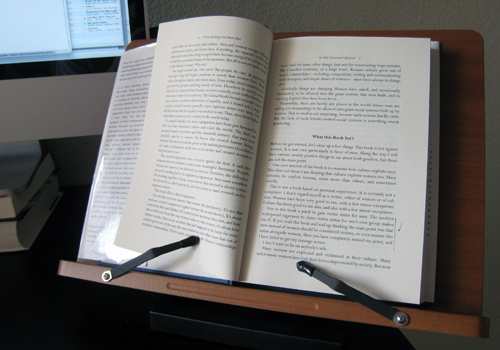
A few months ago I realized that I needed a better way to hold books as I copy passages for both reviews on this blog and for my academic work. A bit of Googling found some really janky looking products that led me to sigh and rig a solution that consisted of a bunch of heavy anthologies (those of you who were English majors might remember the infamous Nortons; they’ve finally become useful again, albeit in a way slightly different from their intent) to lean a book against, while the heaviest of them all sat slightly in front to hold the relevant book up.

Then Kevin Kelly’s blog Cool Tools came to the rescue through a review of the Freesia Book Stand:

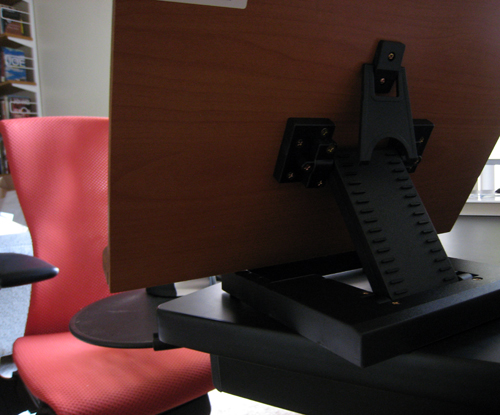
This is a simple but well-designed book stand that does exactly what it sets out to do. It is sturdy enough to hold big, heavy textbooks, but [it] looks nice. It is impressively adjustable, allowing for nearly any reading angle . Amazingly, despite the ability to hold heavy books, the stand itself is relatively light (around 3 lbs). The stand has an anti-skid coating on the bottoms so that it stays where I put it.

Exactly what I wanted. Thank you, Stephanie Misono, for suggesting this. She says, “I now wish I had gotten it years ago.” Me too; I chose the Best Book Stand Jasmine, and it would’ve been insanely useful as an undergrad, when I spent many hours looking at computer science textbooks in particular, going back and forth from page to screen.

The Freesia version is too big, so I ordered the smaller version. I have something similar for standalone printed papers, but even that isn’t nearly as satisfying; I was making edits to a novel earlier, and I flipped from one page to another with greater ease by using the Jasmine. So it’s not only good for copying passages from books, but for holding edited pages.

Does this sound minor? Maybe it is, but managing to find the perfect tool to fulfill a major need is incredibly satisfying, and this is perhaps the best solution I’ve found to a major problem in my life since reading “Tool for Thought” by Steven Berlin Johnson, which concerns DevonThink Pro. Although these tools are useful on a micro level, they probably also change the nature of what I do; as Nicholas Carr says in The Shallows:

Even as our technologies become extensions of ourselves, we become extensions of our technologies […] every tool imposes limitations even as it opens possibilities. The more we use it, the more we mold ourselves to its form and function. […] Whenever we use a tool to exert greater control over the outside world, we change our relationship with that world.

I’m probably more likely to copy marginal passages from books now that it’s become marginally easier both to do so and to organize the output once I have done so. The Jasmine hasn’t yet faded to the point of it reaching what Heidegger called “readiness-to-hand” or “Zuhandenheit,” which, to use Graham Harman’s formulation, “refers to objects insofar as they withdraw from human view into a dark subterranean reality that never becomes present to practical action any more than it does to theoretical awareness.” I’m entirely aware of the Jasmine, which is part of its pleasure, but when it fades “into a dark subterranean reality,” it will be really incorporated into my work (I suspect that writing the dissertation might force this state on me, as one book after another checks in and check out).

The Jasmine cost about $30, with about $10 in shipping. I probably would’ve paid $100 for it. Maybe more. It’s difficult to overstate its usefulness, given the kind of work I do. Students, academics, and bloggers are an obvious audience, but I’m sure other groups would find it useful too.